
Ich arbeite seit Jahren auf Fedora. Linux ist für mich kein Experiment, sondern Alltag. Umso mehr hat es mich gestört, dass Anthropic Claude Desktop offiziell nur für macOS und Windows anbietet. Für Linux: Fehlanzeige.
Mein Kollege bei valantic, Patrick Schönfeld, hat das nicht einfach hingenommen. Er ist KI-Experte, Open-Source-Enthusiast – und jemand, der lieber Probleme löst als darüber redet.
Das Ergebnis: claude-desktop-bin
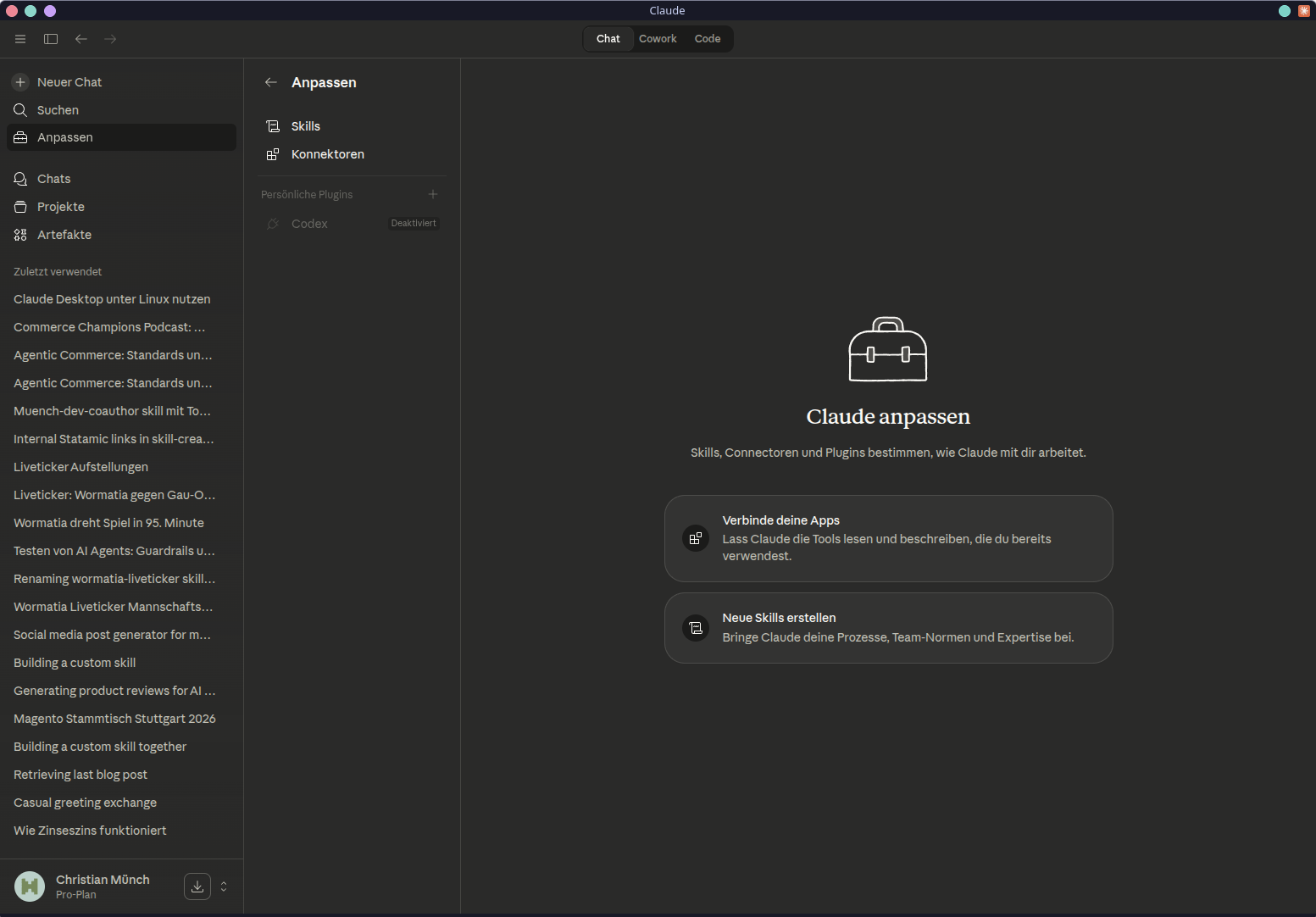
Hier ein Screenshot von meinem Fedora Desktop
Installation: Für jede Distribution
Patrick hat wirklich alle großen Distributionen bedacht. Kein halbgarer Single-Distro-Port.
Arch Linux / Manjaro
yay -S claude-desktop-bin
Updates kommen automatisch über den AUR-Helper – nichts weiter zu tun.
Debian / Ubuntu
Der empfohlene Weg über das APT-Repository bringt automatische Updates mit:
curl -fsSL https://patrickjaja.github.io/claude-desktop-bin/install.sh | sudo bash
sudo apt install claude-desktop-bin
Wer kein fremdes Install-Script ausführen möchte – das ist ein vollkommen legitimer Standpunkt – greift zum .deb direkt von den Releases:
wget https://github.com/patrickjaja/claude-desktop-bin/releases/latest/download/claude-desktop-bin_1.1.5749-1_amd64.deb
sudo dpkg -i claude-desktop-bin_*_amd64.deb
Fedora / RHEL
wget https://github.com/patrickjaja/claude-desktop-bin/releases/latest/download/claude-desktop-bin-1.1.4088-1.x86_64.rpm
sudo dnf install ./claude-desktop-bin-*-1.x86_64.rpm
NixOS
# Ausprobieren ohne Installation
nix run github:patrickjaja/claude-desktop-bin

# Dauerhaft ins Profil
nix profile install github:patrickjaja/claude-desktop-bin
Wer es direkt in die Systemkonfiguration übernehmen will:
{
  inputs.claude-desktop.url = "github:patrickjaja/claude-desktop-bin";

  environment.systemPackages = [
    inputs.claude-desktop.packages.x86_64-linux.default
  ];
}
AppImage (alle anderen)
wget https://github.com/patrickjaja/claude-desktop-bin/releases/latest/download/Claude_Desktop-1.1.5749-x86_64.AppImage
chmod +x Claude_Desktop-*-x86_64.AppImage
./Claude_Desktop-*-x86_64.AppImage
Cowork unter Linux
Cowork ist Anthropics agentic Workspace-Feature – Dateioperationen, Desktop-Automatisierung, Task-Management direkt vom Desktop aus. Auch hier: offiziell kein Linux-Support.
Patrick hat den Windows Service reverse-engineered und unter Linux lauffähig gemacht. Das Projekt: claude-cowork-service
Der Service ist optional. Claude Desktop funktioniert auch ohne Cowork. Wer ihn möchte:
# Schnellinstallation, jede Distribution
curl -fsSL https://raw.githubusercontent.com/patrickjaja/claude-cowork-service/main/scripts/install.sh | bash

# Arch Linux per AUR
yay -S claude-cowork-service
systemctl --user enable --now claude-cowork
Voraussetzung ist die Claude Code CLI – sie muss installiert und im Pfad erreichbar sein. Die Pfade /usr/bin/claude, ~/.local/bin/claude und /usr/local/bin/claude werden automatisch erkannt.
Was dahintersteckt
Das ist kein Quick-Port. Das Paket enthält eine ganze Reihe gezielter Patches, die aus Claude Desktop – einer Electron-App, primär für macOS entwickelt – eine funktionale Linux-Anwendung machen. Tray-Icon-Integration, DBus-Handling, MCP-Server-Support, Computer Use via xdotool und scrot – alles dabei.
Ein automatisierter CI-Job prüft täglich auf neue Claude-Desktop-Versionen, validiert alle Patches in Docker und stellt sicher, dass nur funktionierende Builds ins AUR kommen. Das ist solide Arbeit.
Ein Hinweis für Wayland-Nutzer: Der globale Shortcut (Ctrl+Alt+Space) funktioniert nur unter X11. Wer auf einem Wayland-Compositor unterwegs ist, startet Claude Desktop so:
claude-desktop --ozone-platform=x11
Das lässt sich auch dauerhaft in der .desktop-Datei eintragen.
Fazit
Es ist inzwischen ein bekanntes Muster: Hersteller ignoriert Linux, Community oder engagierte Entwickler wie mein Kollege Patrick übernehmen.
Danke, Patrick – für die Arbeit, die da drin steckt. Das Ergebnis ist wirklich brauchbar.
Habt ihr Claude Desktop unter Linux schon ausprobiert? Auf welcher Distribution läuft es bei euch?
Update 7. April 2026
Ich habe den Text nach Feedbacl von Patrick nochmal angepasst. Bei RPMs und AppImage hatte ich geschrieben, dass es keine automatischen Update gibt. Das war nicht korrekt. Patrick hat auch für diese Installationen ein automatisches Update bereitgestellt.