
Not every task in an n8n workflow needs a large language model that writes text, argues at length, or plans several steps. Sometimes a model only needs to classify something, assign a score, or make a yes-or-no decision.
Decision Models, also called System 1 models, are designed for these kinds of tasks. I use them in my n8n workflows through Opper AI. They have allowed me to remove some LLM requests. For clearly defined decision tasks, these models are more efficient and faster for me.
What are Decision Models?
Decision Models are designed for tasks where a model needs to make a choice or return an evaluation. Examples include:
- Classifying content
- Assigning a score or rating
- Making a yes-or-no decision
- Assigning an input to a suitable category or route
- Checking whether a request may contain signs of a prompt injection
This distinguishes them from typical generative tasks. If a workflow needs a longer text, an explanation, or several alternative phrasings, a generative model is still the right fit. If the desired output is a decision, a Decision Model is worth considering.
Beyond individual workflows
Decision Models do not have to appear as visible steps in a workflow. They can also work in the background to speed up decisions that might otherwise be made by a larger generative model.
One example is coding agents. Plugins or extensions can use Decision Models in the background to select the right tool or sub-agent more quickly. The Decision Model does not generate the code or carry out the underlying task. It makes a narrowly defined selection so the agent can take a more targeted next step.
More complex processes are possible too: several Decision Model calls can be chained into a dynamic decision tree. The result of one decision determines which question or model call comes next. This lets a system choose a suitable path through a set of options step by step, rather than handling every possibility in a single large LLM call.
The more decision steps a process contains, the more important it is to test the entire decision path. An error early on can affect all subsequent decisions. Each output should therefore be clearly defined, verifiable, and suitable as input for the next step.
Why I use them in n8n
In n8n, an LLM is often called as one step in a larger workflow. The next step may only need a small result, such as a tag, a score, or a value that determines how the workflow branches.
A model that generates detailed text may do more than the task requires. For my decision tasks, Decision Models are a faster and more efficient option. In my specific Opper AI setup, I pay only for input tokens, while output is free. This is a feature of the service I use and does not automatically apply to every provider or model.
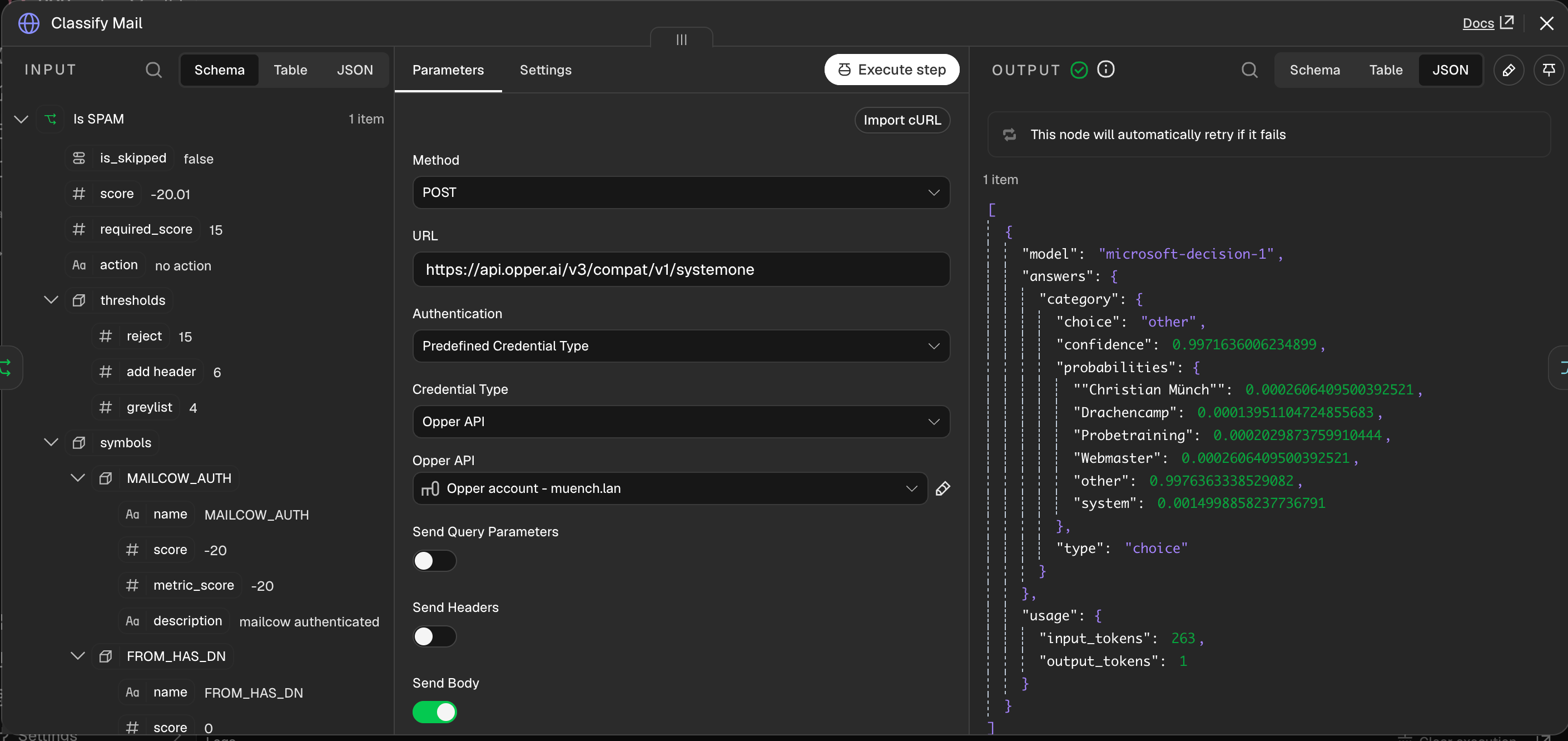
Another practical feature is structured, machine-readable JSON output. If the model returns the required format directly, an additional output parser may not be needed in n8n. This reduces processing steps and may avoid another LLM call.
That does not eliminate the need to validate the result. JSON can be syntactically correct but still wrong in substance. I therefore test the output with representative examples and check that it matches the expected schema.
An example from my workflow
I use a Decision Model in my workflow for automatically tagging Linkding bookmarks. The model assigns bookmarks to a predefined tag structure. It does not need to write an article or provide a lengthy explanation. The task is classification.
The workflow also shows that choosing a model is only one part of the solution. The tag structure and classification instructions need to be clear enough for a model to apply them consistently. A cheap and fast model cannot automatically fix an unclear taxonomy.
Decision Models as a screening step for LLMs
Decision Models can also support generative models indirectly. Opper AI uses them to detect prompt injections in LLM requests. A fast Decision Model can act as a screening step before a request is passed to a generative model.
This is not a comprehensive security strategy. As with other classification tasks, I should test this detection with suitable test cases and account for the possibility that a model may miss a problematic input or incorrectly flag a harmless one.
Comparing models and costs
Opper AI lists models with Decision capabilities in its model overview. The overview includes information such as prices and context sizes, which can help identify suitable candidates.
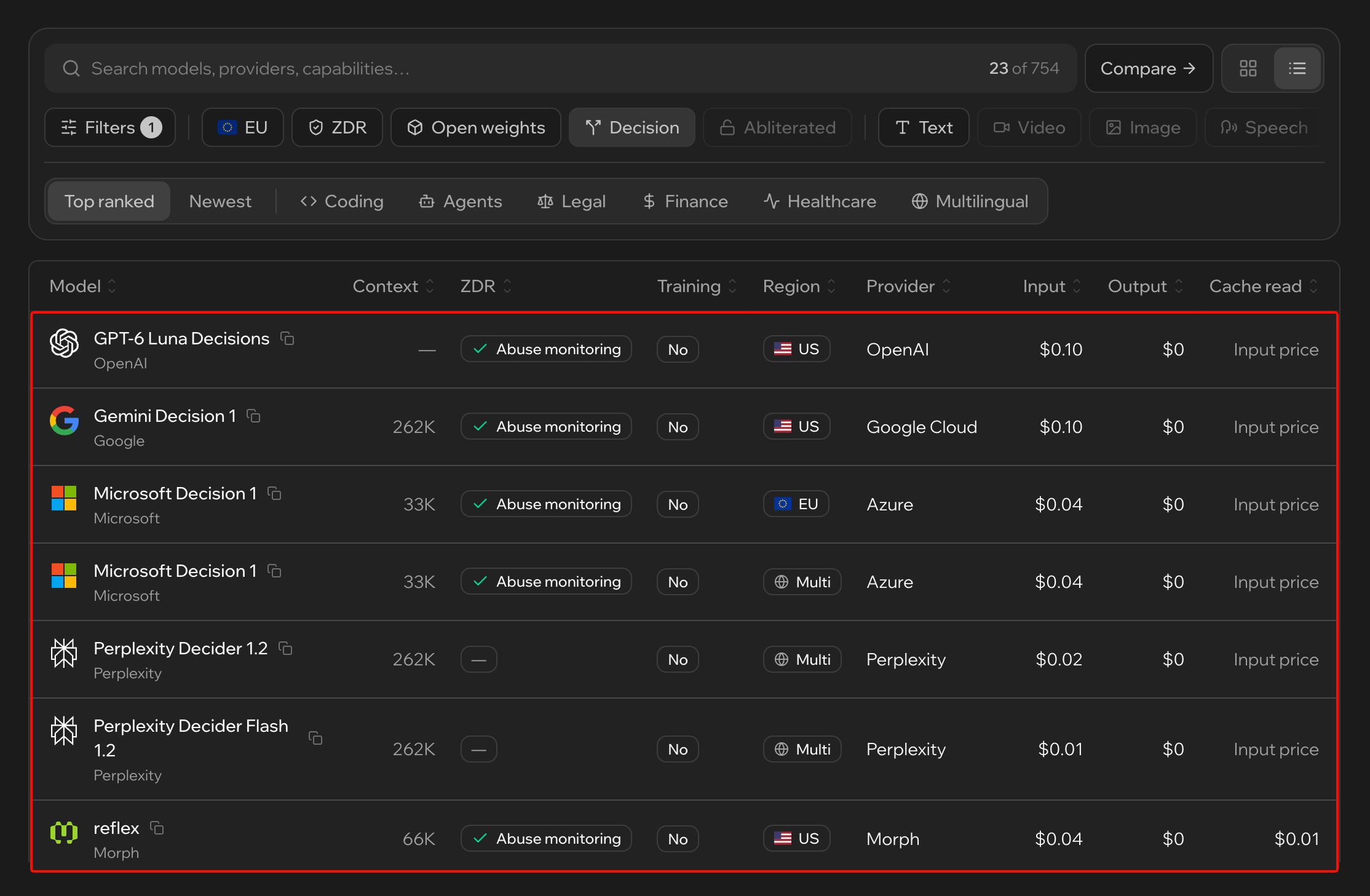
Price should not be the only deciding factor. For a workflow, these questions also matter:
- Is the model suited to the specific decision task?
- Is the available context size sufficient for the input?
- Does the model reliably return the required JSON format?
- How fast is it in the actual workflow?
- What data is sent to the provider and the selected model?
- What are the total costs for my own usage?
Model catalogues and prices can change. I check the provider's current information rather than treating prices as permanent.
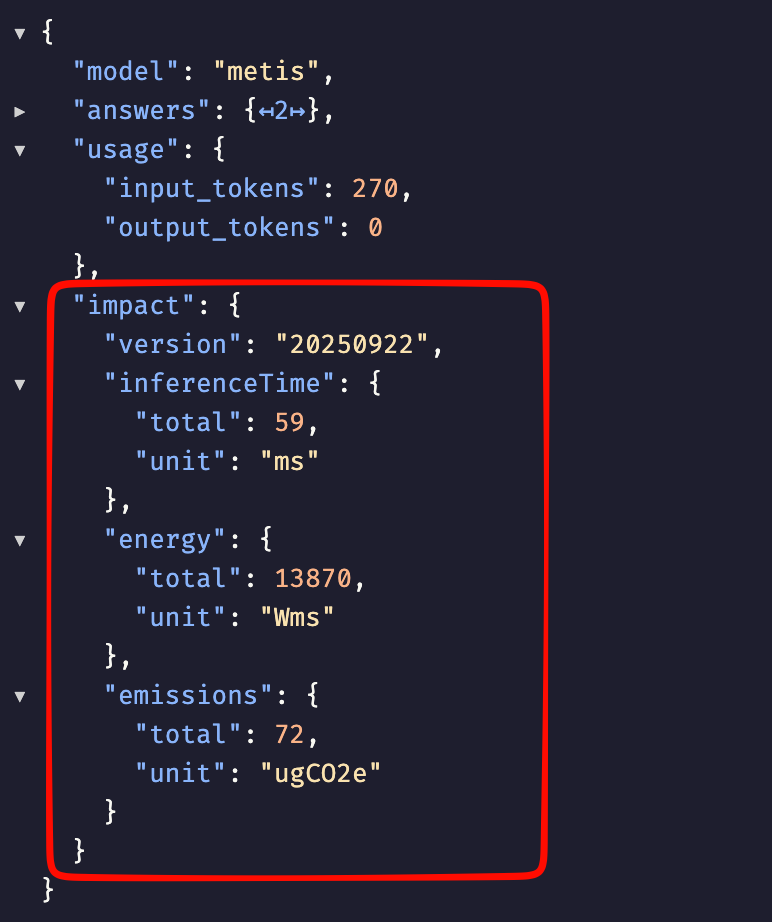
Environmental impact can also be part of the comparison. GreenPT, based in the Netherlands, states that it reports the CO₂ emissions associated with its output. Such information can provide additional context. For a meaningful comparison, it is worth checking exactly what is measured and how the figures are calculated.
Pac-Man as a benchmark for Decision Models
Opper has also come up with an accessible way to compare Decision Models: in the JevMan benchmark, the models play Pac-Man against the classic ghosts.
At each intersection, the model has to make a decision. It returns probabilities for the possible directions, and the game selects the next move from them. This makes it possible to observe how the models perform across a series of concrete decisions.
According to Opper, each model plays 100 games. The leaderboard includes metrics such as average score, best individual score, survival rate, latency, number of fallback moves, and cost per game. Responses taking longer than two seconds are replaced by a simple fallback rule.

Pac-Man does not represent every real-world classification or routing task. The benchmark is nevertheless an easy-to-understand way to compare decision models under the same game conditions. Its results do not replace testing with the data and requirements of your own workflow.
The JevMan benchmark has also attracted attention beyond Opper's website. Forbes discusses it in an article about the new generation of AI Decision Models: “Decisions, Decisions: A Guide to the New Wave of AI Decision Models Besides Jev”.
Decision Model, traditional method, or generative model?
Decision Models are not automatically the best choice for every workflow. I first check whether a task can be solved entirely with rules, a code node, or another traditional method. If the inputs are structured and the rules are clear, that may be the simplest and most cost-effective solution.
If the inputs are unstructured or require interpretation, a model may help. The next question is whether the model needs to generate text or whether a decision is enough.
This fits the approach I describe in “Stable vs. volatile: When traditional automation is the better choice”. Traditional automation, Decision Models, and generative models have different strengths. The key is to choose the right tool for each step.
Decision Models can complement traditional automation and take over specific tasks from an LLM workflow. But they cannot fully replace LLMs: they make decisions, classify, or evaluate, but do not create new content. If a process needs to generate, rewrite, or summarise text in detail, a generative model is still needed.
Where could an existing LLM call be replaced?
For every workflow step involving an LLM, it is worth asking:
- What does the next step actually need? Text, or just a decision?
- Can I solve the task with rules? If so, a model may be unnecessary.
- If a model is needed, would classification, evaluation, or routing be enough? A Decision Model might do the job.
- Do I really need an explanation or creative output? A generative model is needed for that step only if the answer is yes.
- Has the output been tested? Check normal cases, edge cases, and inputs that do not have a clear answer.
Conclusion
Decision Models are a useful option for tasks where a model needs to classify, evaluate, or make a yes-or-no decision. They can be used in workflows such as n8n, but they can also speed up tool or sub-agent selection in coding agents behind the scenes. Multiple calls can also be connected into dynamic decision trees. The more steps a decision path contains, the more important it is to test both the individual decisions and the complete process.
In my n8n setup with Opper AI, I have been able to remove some LLM calls. Structured JSON output can also make a separate output parser unnecessary. Decision Models can support generative models as a fast screening step too, for example when detecting prompt injections before an LLM call.
The most important question is not which model is currently the most capable. It is whether the process needs a generative model at all, or whether traditional automation or a Decision Model is enough.
When the task is clearly bounded, comparing these options is worthwhile. It can reduce costs and processing steps and make the workflow faster.