
Since October 27, the beta of n8n 3.0 has been available. The stable release is expected in early December. The major version bump isn't just marketing: n8n is clearing out legacy nodes, tightening security defaults and rebuilding parts of the execution engine. In queue mode, manual executions will always run on workers, the in-memory mode for binary data is going away, and the timeout for the Code node drops from five minutes to one.
My n8n instance has become a central building block of my homelab. It runs self-hosted with Docker, PostgreSQL, Redis in queue mode and external task runners. On top of that there are 216 workflows, some of which run daily or even several times a day. So I didn't want to jump straight to the beta. Instead, I wanted to prepare the instance while still on 2.x so that the actual upgrade step becomes unspectacular.
One point made me especially cautious: the move to 3.x is a one-way street. The only way back to 2.x is via a backup.
The Migration Report as a Starting Point
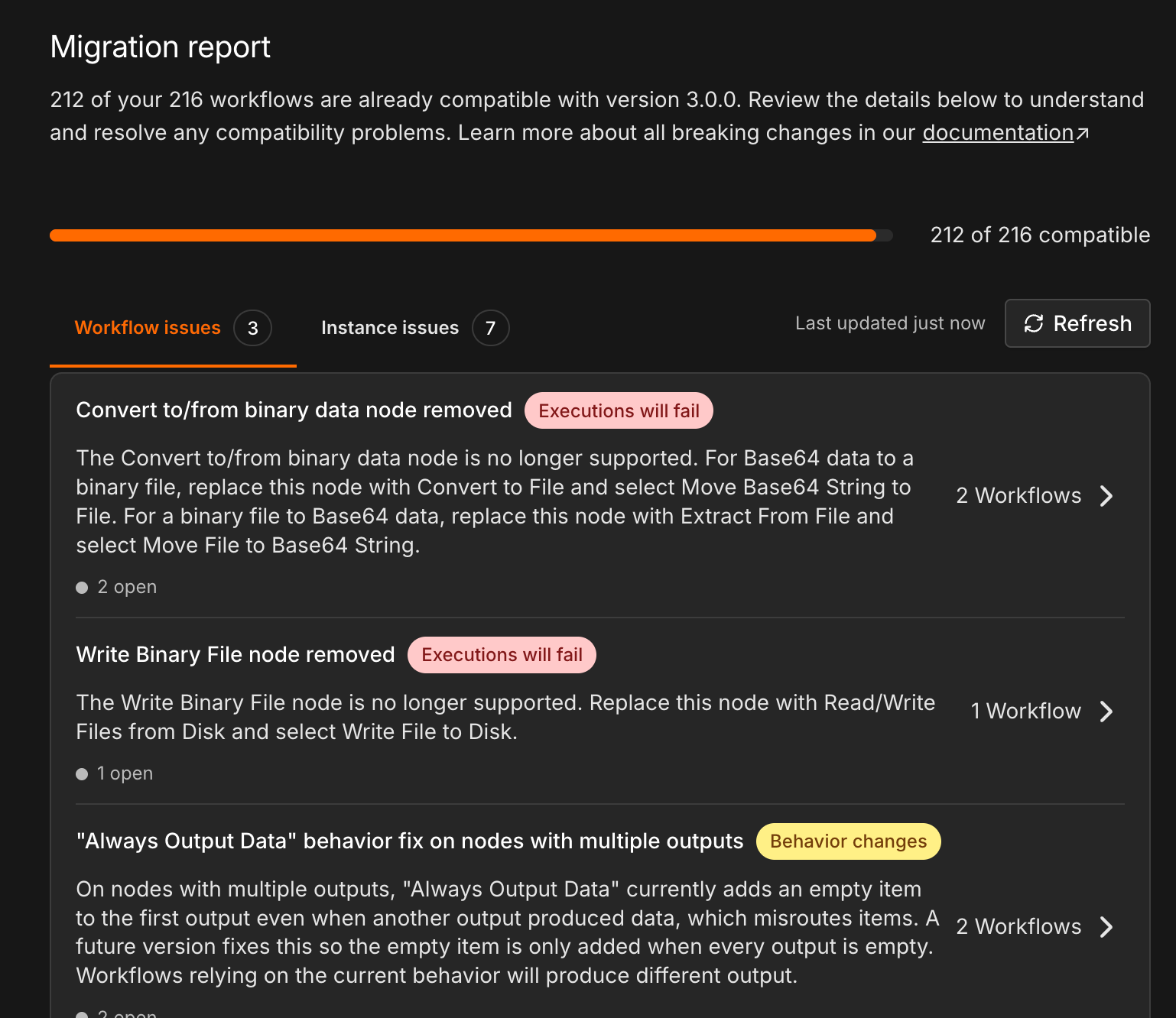
Since version 2.39, n8n ships a tool under Settings → Migration report that is designed for exactly this kind of preparation. The report checks two things:
- Workflow issues: All workflows are scanned for nodes that will be removed or behave differently in v3.
- Instance issues: The configuration of the instance itself, i.e. environment variables and defaults that are changing.
Each item carries a label. "Executions will fail" means something will break after the upgrade. "Behavior changes" means it keeps running but may produce a different result. This distinction helps enormously with prioritization.
My starting point looked like this: 212 of 216 workflows compatible, three workflow issues and seven instance issues.
The instance tab shows the infrastructure issues. This is where it gets interesting for self-hosters, because these items can't be fixed in the editor, only in the Docker setup.
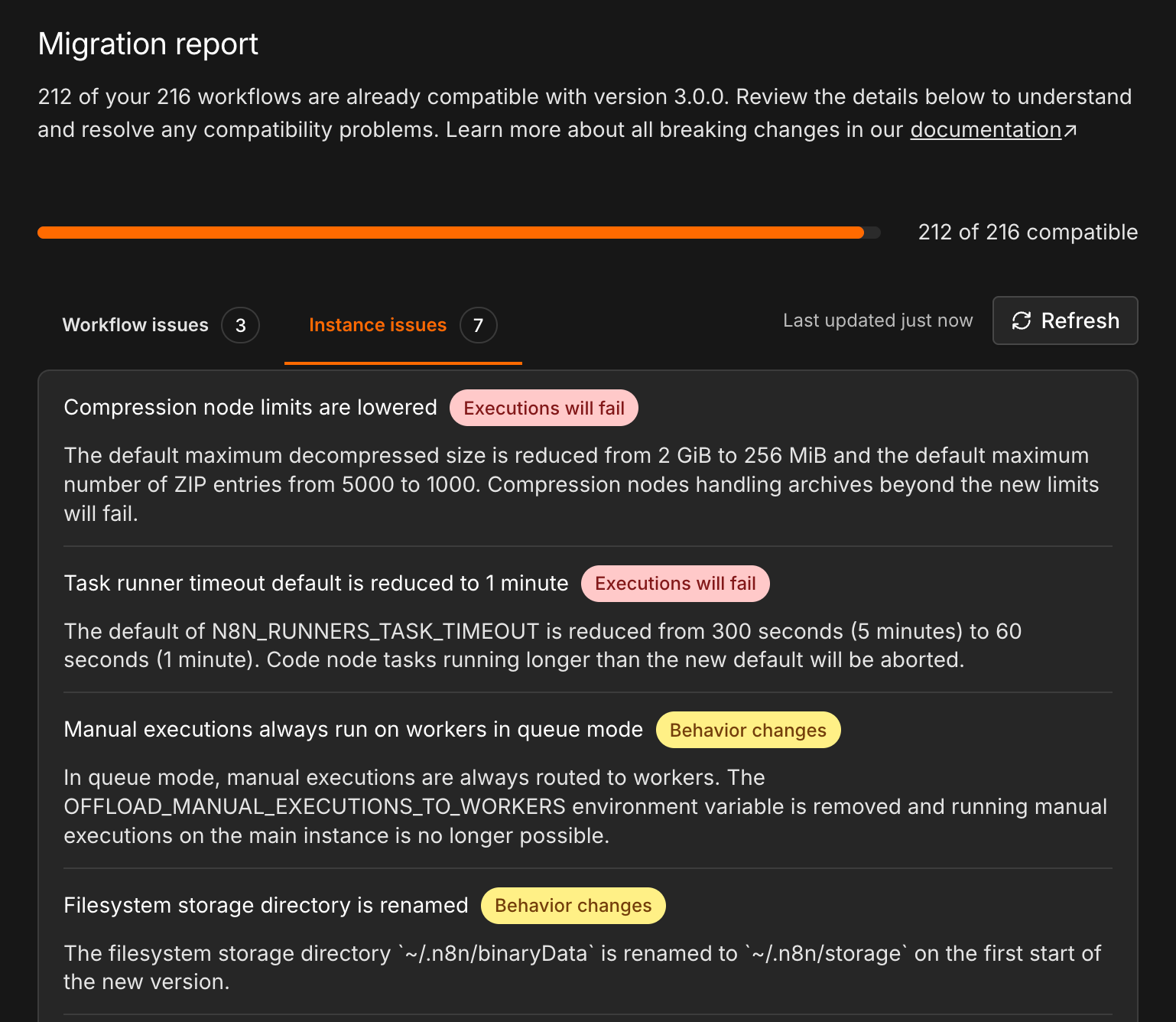
An overview of the instance issues relevant to me:
| Topic | Variable | Old | New in v3 |
|---|---|---|---|
| Compression limits | N8N_COMPRESSION_NODE_MAX_DECOMPRESSED_SIZE_BYTES / N8N_COMPRESSION_NODE_MAX_ZIP_ENTRIES |
2 GiB / 5000 | 256 MiB / 1000 |
| Task runner timeout | N8N_RUNNERS_TASK_TIMEOUT |
300 s | 60 s |
| Manual executions | OFFLOAD_MANUAL_EXECUTIONS_TO_WORKERS |
optional | removed, always on workers |
| Storage directory | N8N_MIGRATE_FS_STORAGE_PATH |
~/.n8n/binaryData |
~/.n8n/storage |
| Unverified community packages | N8N_UNVERIFIED_PACKAGES_ENABLED |
true |
false |
| Binary data mode | N8N_DEFAULT_BINARY_DATA_MODE |
default (in-memory) |
default is no longer valid |
The complete list is available in the documentation on breaking changes.
Snapshot First, Everything Else Second
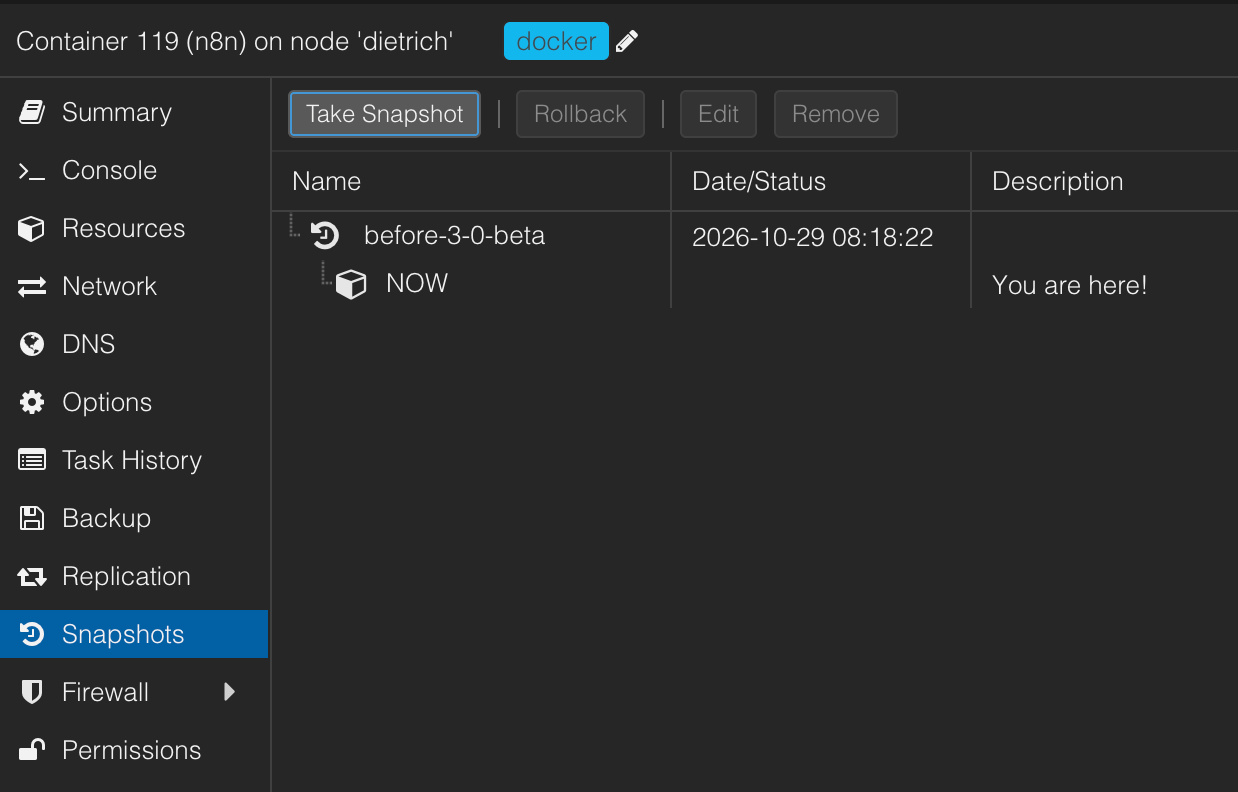
My n8n runs in an LXC container on Proxmox. Before anyone, human or agent, touches the configuration, there's a snapshot. It takes a few seconds and, if in doubt, is the fastest way back.
Instance Check with OpenCode
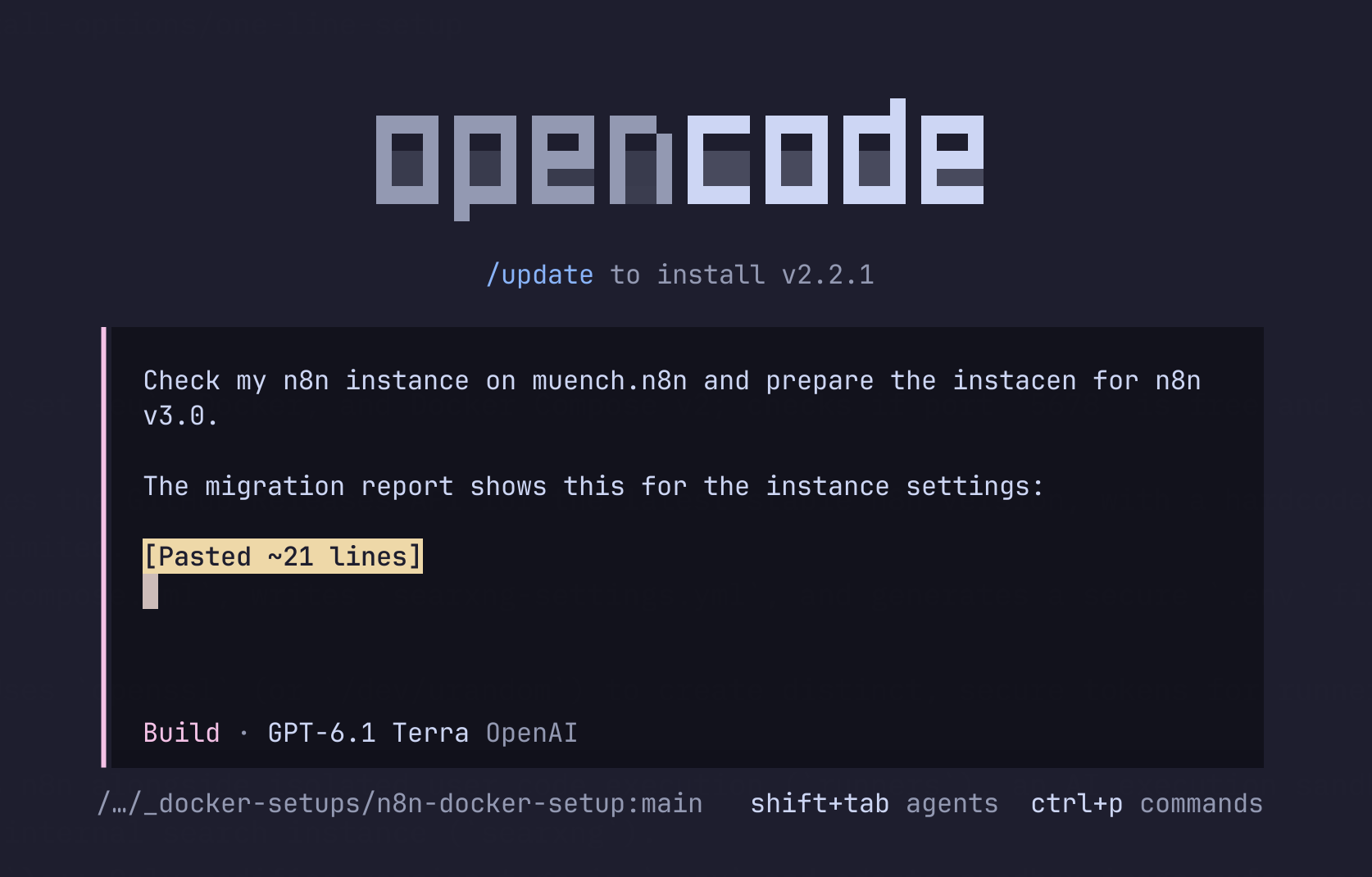
My Docker setup for n8n lives as a repository on my local machine, and the agent additionally has SSH access to the server. For the check, I started OpenCode in a session in herdr. The screenshot still shows GPT-6.1 Terra selected, but the actual work was then done by GPT-6.1 Sol from OpenAI.
The prompt was deliberately short. I added the content of the instance issues from the migration report via copy & paste. The agent has no access to the report's UI, so I gave it the relevant information directly.
Analyze First, Change Nothing
What I noticed positively was that in the first pass the agent only analyzed. No file changed, nothing restarted. Instead, it produced an inventory:
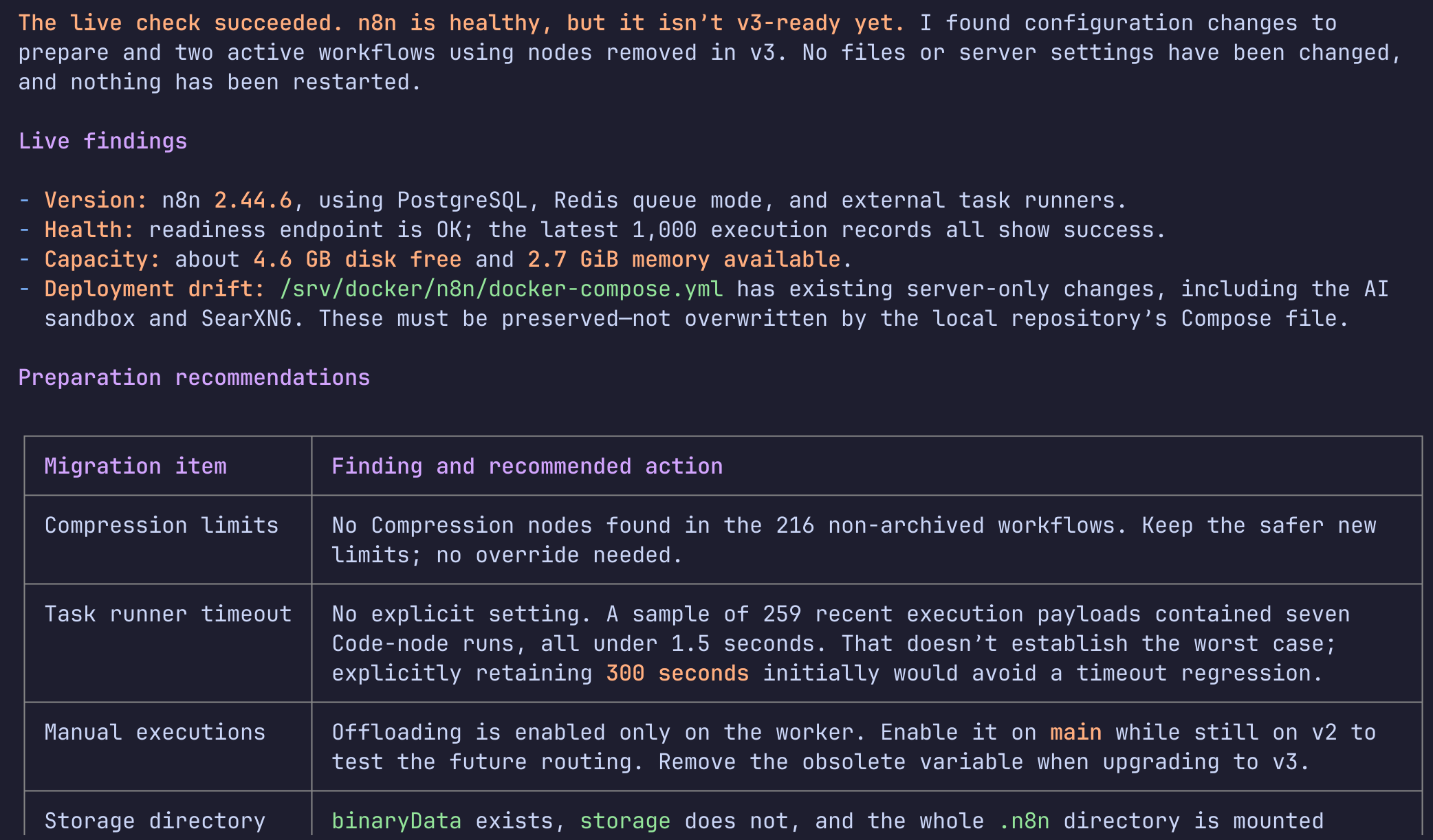
The most important finding for me was the deployment drift. The docker-compose.yml on the server contained changes that had never made it back into the repository, including an AI sandbox and SearXNG. Had the agent simply copied up the local file, those services would have been gone. It recognized this and marked the server changes as "must be preserved". To be honest, that's a problem I caused myself.
I also found the reasoning on the task runner timeout sound: in a sample of 259 executions there were seven Code node runs, all under 1.5 seconds. That actually argues for the new default of 60 seconds. But a sample says nothing about the worst case. So the recommendation was to explicitly set 300 seconds for now. That's conservative, but for me it's the right first step.
In addition, the agent found two active workflows that use nodes being removed in v3:
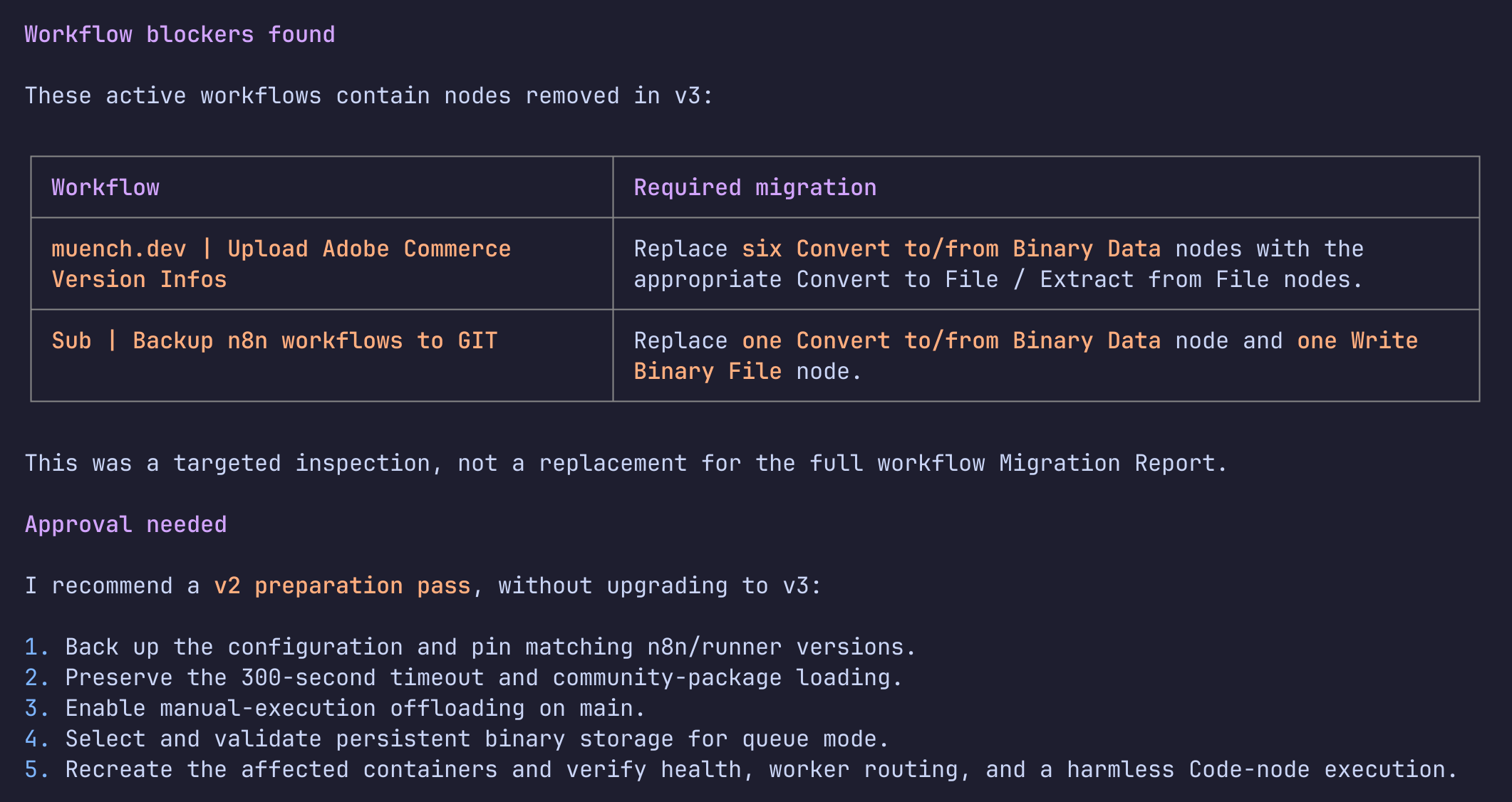
It points out itself that this is only a targeted check and not a replacement for the migration report. This led to a proposal for a "v2 preparation pass": the instance stays on 2.x but is configured so that it already behaves like v3 or explicitly keeps the old values.
Preparation on 2.44.6
After my approval, the agent implemented and verified the following changes:
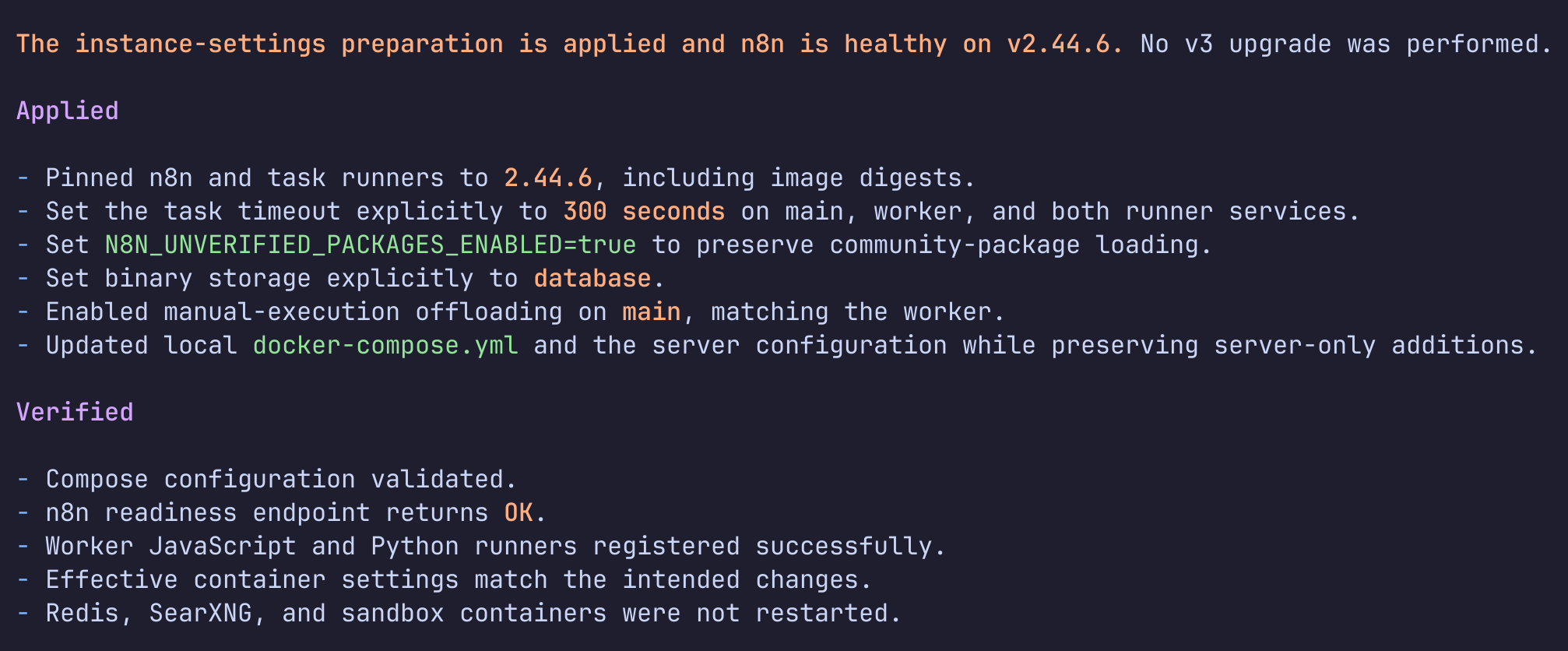
- Versions pinned, including image digests for n8n and the task runners. This way no
latesttag can accidentally slip me the beta. N8N_RUNNERS_TASK_TIMEOUT=300on main, worker and both runners.N8N_UNVERIFIED_PACKAGES_ENABLED=true, so my community nodes keep loading.- Binary storage explicitly set to
database, since the implicit default is going away. - Offloading of manual executions on main as well, so I can already test the future behavior under v2.
I'm not entirely happy about the unverified packages topic. n8n disables this in v3 for good reason. I've left it enabled for now so nothing breaks. In the medium term, I want to check which community nodes I really need and whether verified alternatives exist.
Second Round: Compression and Storage Directory
After that, two topics remained open, which got a short second round:
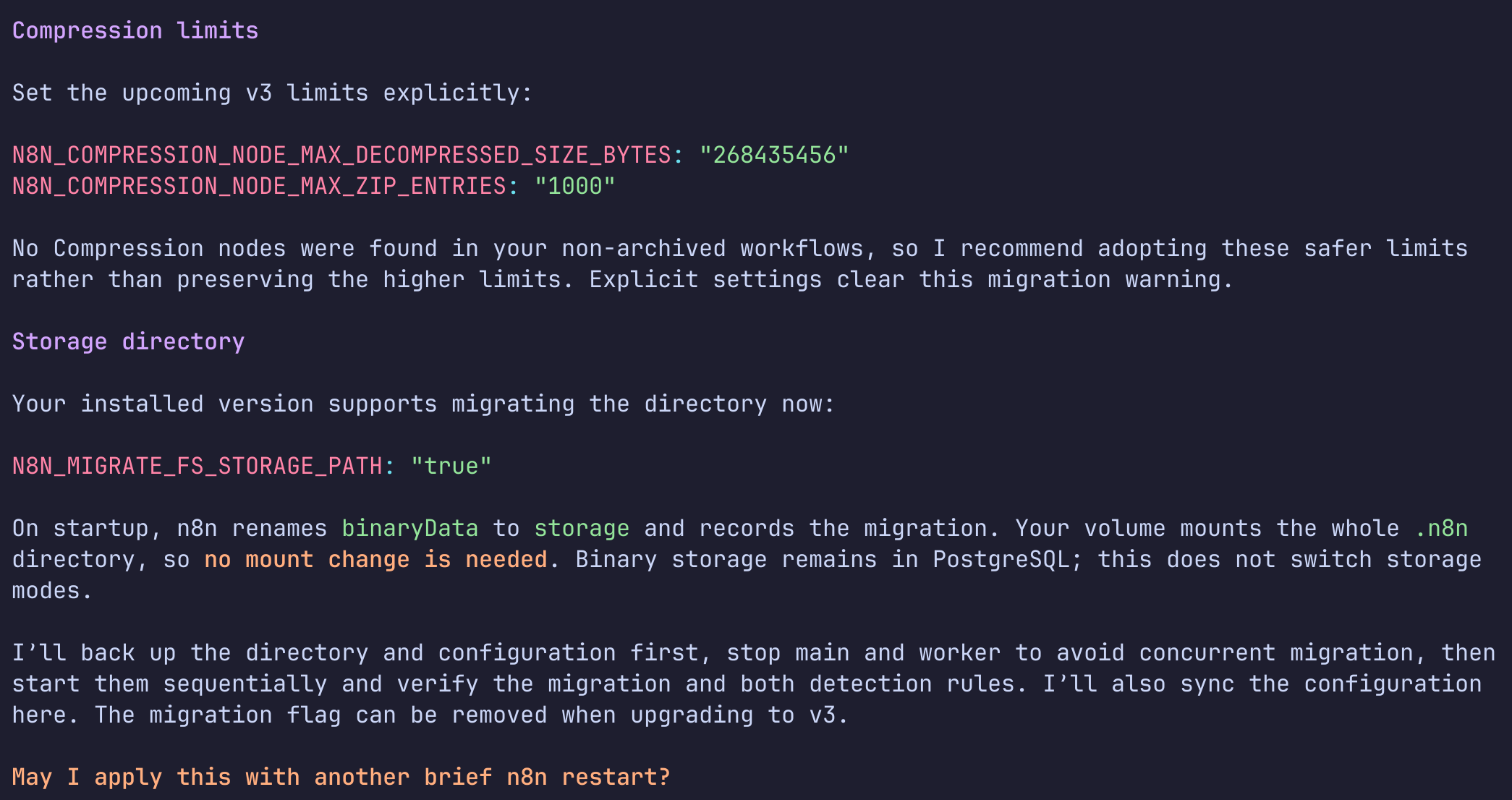
Since none of my workflows use a Compression node, there was no reason to keep the old, generous limits. Setting the new values explicitly also removes the warning from the report.
For the storage directory, N8N_MIGRATE_FS_STORAGE_PATH=true provides a switch that performs the rename from binaryData to storage while still on 2.x. Since my entire .n8n directory is mounted as a volume, no change to the mount was necessary. The agent stopped main and worker so they wouldn't both migrate in parallel, and then started them one after the other. The switch can be removed again when upgrading to v3.
Converting Workflows by Hand
I adjusted the affected workflows manually. This could certainly also have been done by an agent via n8n's instance-level MCP server. But with only a handful of nodes, I was faster this way and could check the result directly in the editor.
The migration report points the way:
- Convert to/from Binary Data, direction JSON/Base64 → file: replace with Convert to File.
- Convert to/from Binary Data, direction file → Base64: replace with Extract From File using "Move File to Base64 String".
- Write Binary File: replace with Read/Write Files from Disk using "Write File to Disk".
In my workflow for the Adobe Commerce version information, a JSON structure is uploaded as a file to a server via SSH. The old Move Binary Data (JSON to Binary) became a Convert to File:
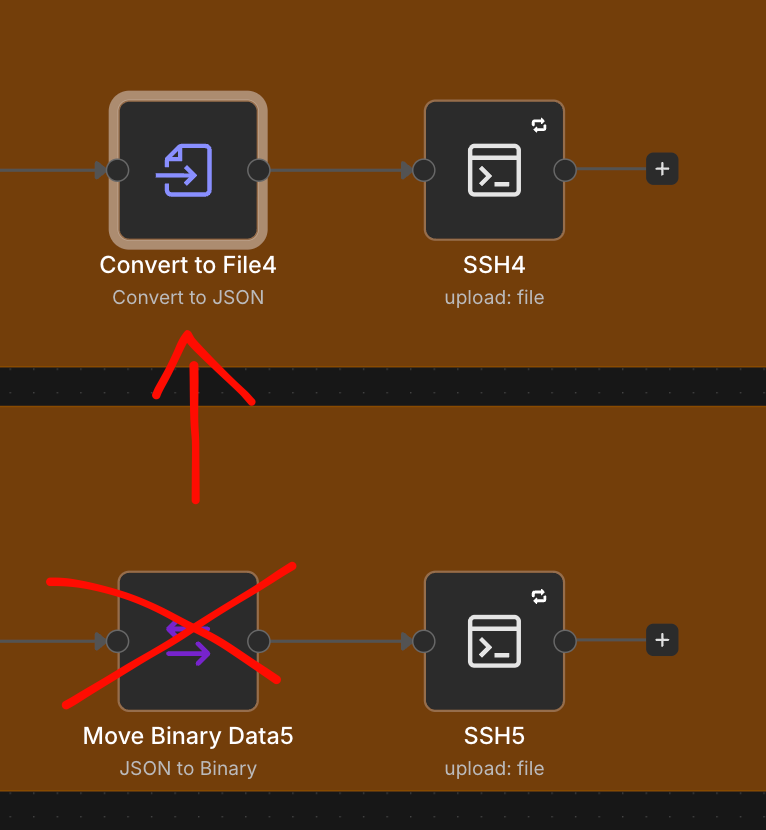
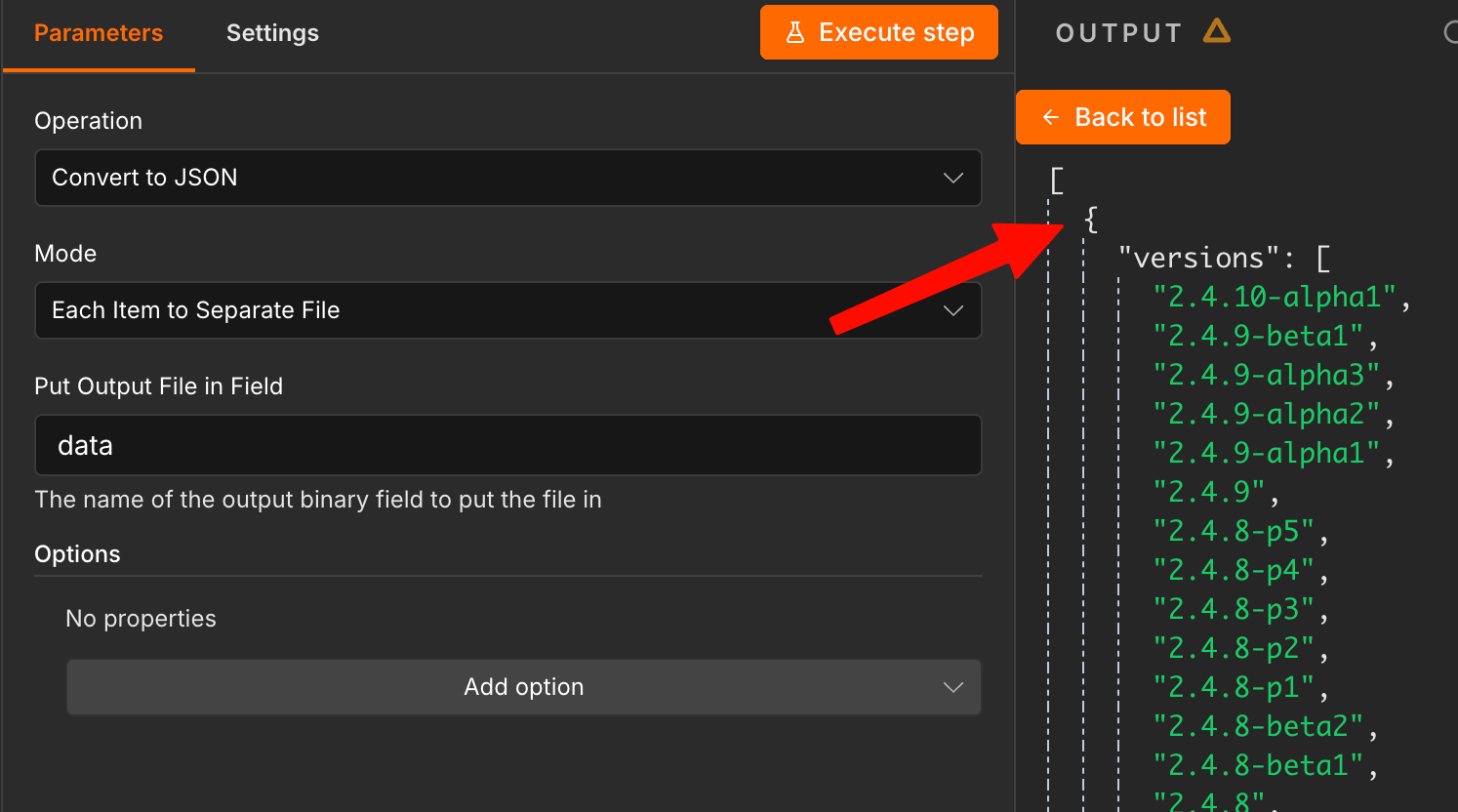
The settings are straightforward: operation "Convert to JSON", mode "Each Item to Separate File" and the output field data, so the subsequent SSH node finds the binary field as before. It's important to run it once afterwards and compare the output. Here, the file contains the JSON with the versions, just as before.
Always Output Data: The Silent Behavior Change
The third item in the report is the trickiest, because it doesn't break anything, it just routes differently. For nodes with multiple outputs, such as If or Switch, "Always Output Data" currently attaches an empty item to the first output, even if another output delivered data. In v3, the empty item is only created when all outputs are empty.
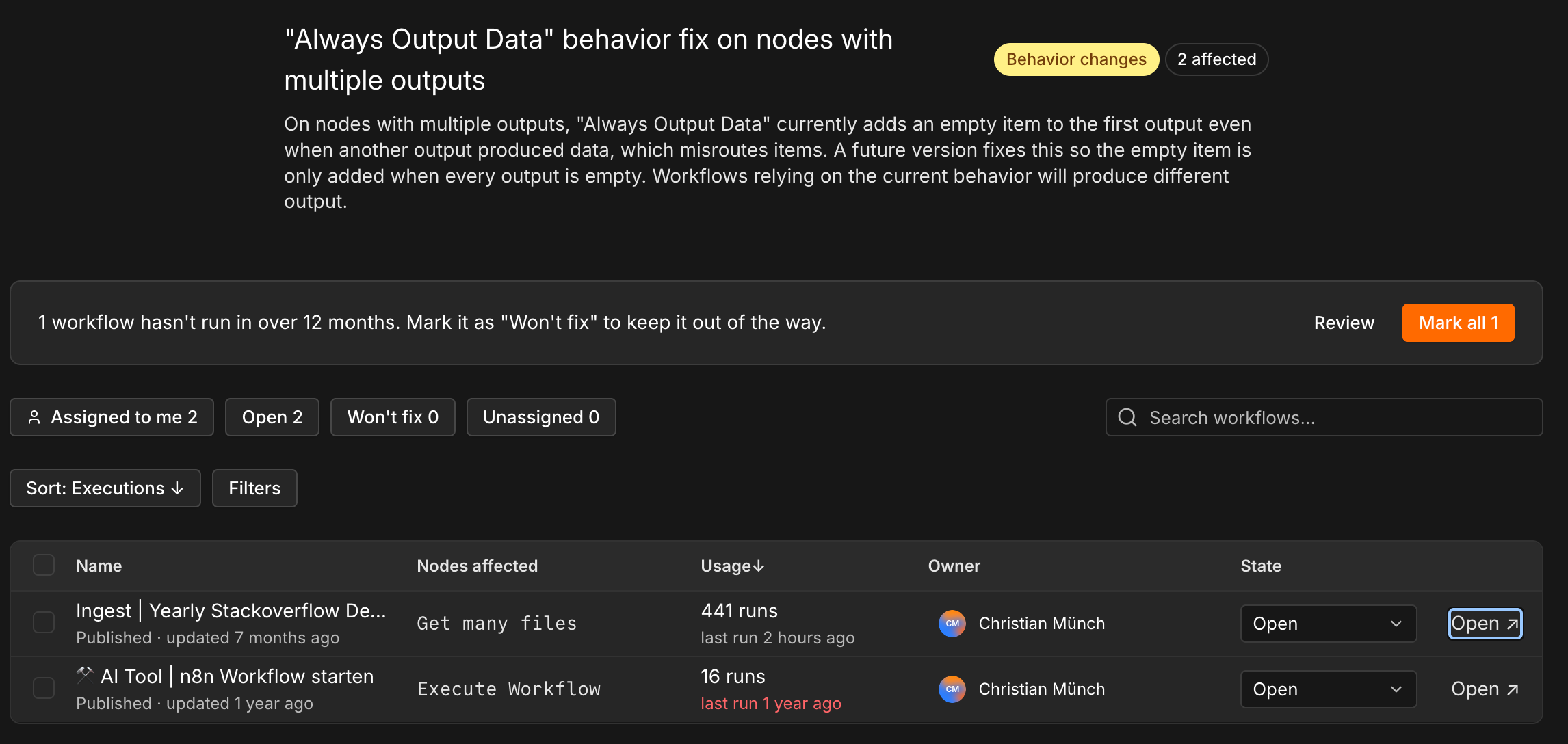
I find it handy that the report detects workflows that haven't run in over twelve months and offers to mark them all at once as "Won't fix". This keeps the list clean without having to work through legacy cruft.
For me, the matter was settled quickly. I looked at both workflows. At the affected points, only a single item is ever processed, so the changed logic has no effect. I therefore set both workflows to "Won't fix" in the migration report. That doesn't mean ignoring the issue. It documents that you've checked it and made a conscious decision. If a workflow distributes multiple items across If or Switch nodes, a closer look at the outputs is worthwhile.
The Result
After the adjustments, the migration report shows 216 of 216 compatible workflows and no more workflow issues.
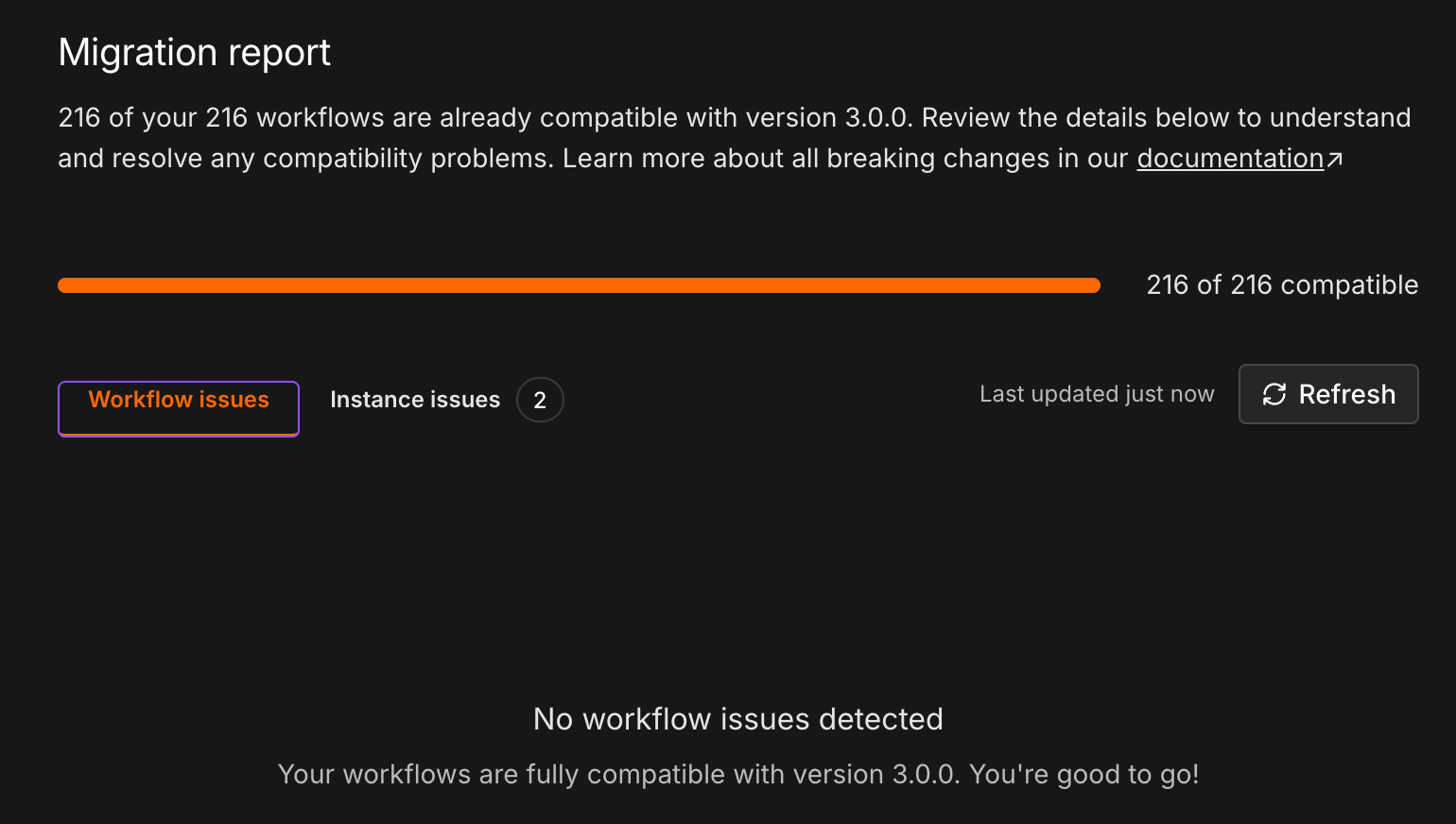
Two instance issues remain open. Both carry the label "Capability removed" and are more notices than to-dos:
- Chat Hub is deprecated and disabled by default. In v3, the "Chat" section disappears from the UI. It can be re-enabled via
N8N_ENABLED_MODULES, but the feature will be removed entirely in v4. - "Import from URL" in the editor is removed.
I don't use either, so there's nothing to do here. But anyone using Chat Hub in production should start thinking about an alternative now. Re-enabling it only postpones the problem until v4.
The instance continues to run stably on 2.44.6. The actual switch to v3 is now essentially a swap of the image tag plus removing the transitional variables.
My Assessment
The migration report is the best upgrade tool I've seen in n8n so far. Instead of matching a changelog against 216 workflows, I get a concrete list with recommended actions. The classification into "breaks" and "behaves differently" saves time.
The agent was particularly helpful with the infrastructure part: reading configuration, analyzing executions, detecting drift, implementing and verifying changes. These are tasks I could have done myself, but they would have taken considerably longer. The fact that it asked for approval before every change and every restart was a prerequisite for me.
But there are limits too:
- The agent can't see the migration report. I had to hand over the content myself.
- I need to be able to evaluate the recommendations. Whether a 300-second timeout makes sense or whether unverified packages may stay enabled is a decision I make, not the model.
- Without a snapshot and pinned versions, I wouldn't let something like this run.
Conclusion
Anyone running n8n themselves should look at the migration report now, not only once the stable 3.0 is released. My approach in short:
- Update to the latest 2.x and open the migration report.
- Create a snapshot or backup.
- Resolve instance issues in the Docker setup, ideally while still on 2.x.
- Convert affected workflows and compare the outputs.
- Mark checked, unaffected items and legacy workflows as "Won't fix".
- Only then switch to v3, ideally on a test instance first.
With the instance prepared, I'm looking forward to the v3 upgrade fairly relaxed (much like my migration to v2 a year ago).