I wanted to get more out of my existing Home Assistant installation. Not because I was missing a new system, but because I realized that quite a lot of information was already being collected around the house. It just was not always arranged usefully or easy to find at a glance.
So I had Claude Code and OpenCode review and rework my Home Assistant configuration. OpenAI models were used in both cases. The result is more than a new dashboard: it shows how existing infrastructure can be put to better use, how monitoring lays a foundation for automations, and where coding agents can help maintain a system that has grown over time.
Making the existing data easier to read
Most of the rework concerned Home Assistant’s “Overview” view. I rebuilt seven other views following a common pattern. Instead of tile collections that had evolved differently, there are now clearly structured sections with headings and icons, consistent tiles, and compact history charts.
Which measurements appear depends on the area. They include temperature, humidity, radon, electrical power and CO, among others. A tile shows me the current state; a small history chart helps put it into context. Is a temperature unusual, or has it been like that all day? Has a measurement just changed, or is the trend stable? A graph often answers more than another number does.
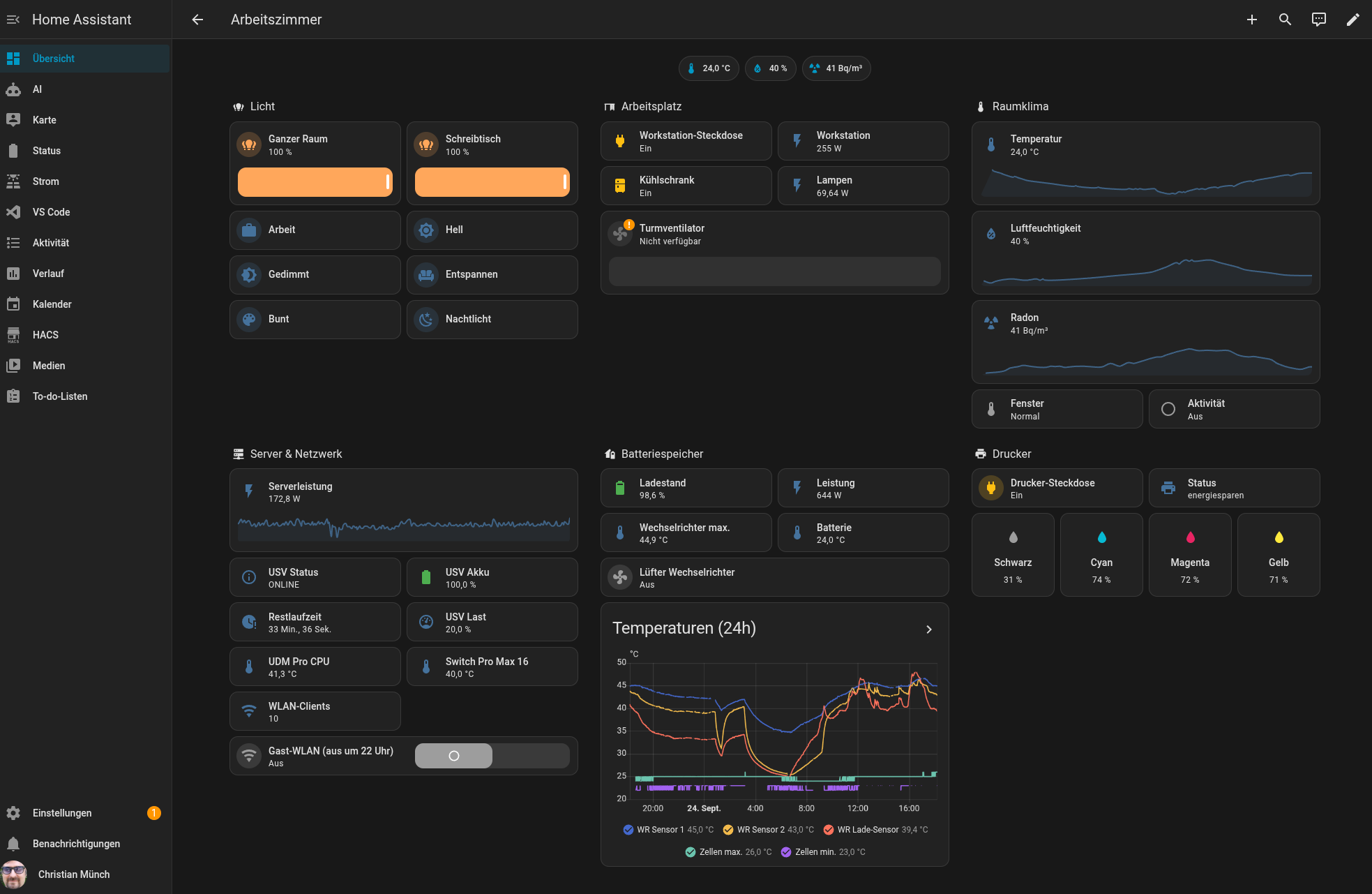
The goal was not to fit in as much data as possible at once. A dashboard should answer the questions that actually arise in everyday life. Empty sections and duplicate cards have therefore disappeared. I removed references to devices that no longer exist and a broken camera card. Labels and typos were cleaned up too. That sounds mundane, but it makes an interface easier to read and prevents outdated entries from undermining trust in the display.
Additional functions complement the existing views: a weather forecast, music controls, options and child lock for the dishwasher, and the battery levels of the smoke and CO detectors. The guest Wi-Fi switch is now in the network section. Its automatic shutdown at 10 p.m. remains in place. This is a small example of how not every improvement needs new sensors. Sometimes it is enough to move an existing function to where you expect it to be.
Warnings that appear only when needed
A common weakness of smart-home dashboards is the constant presence of status information. When every state is displayed equally prominently, an important message is just one tile among many. I therefore wanted warnings that appear only when there is a specific reason for them.
Among other things, the views highlight smoke and CO alarms, low batteries, detectors at the end of their service life or outside their normal state. Protective shutdowns of Shelly outlets are also reported, for example due to overheating, overcurrent, overvoltage or overload. There are also notices for low dishwasher salt and rinse aid, and for a finished dishwasher cycle. A detector with a weak wireless signal remains visible for as long as the problem persists. In the case of a smoke or CO alarm, I can silence the detector directly in the corresponding section.
For the outlets powering refrigerators and freezers, it was also important to me that touching a tile should not accidentally switch off the appliance. This is a small usability change, but an important separation between displaying status and taking action: not every piece of information needs to be a switch at the same time.
This kind of dashboard is more useful to me than the most complete possible device list. I still see relevant states, but the interface directs my attention toward deviations. For that to work, the underlying entities naturally need to be maintained. A pretty warning is no help if the integration behind it stopped providing reliable data long ago.
Measurements become automations
A new dashboard now also shows usage of several AI services: costs, requests and token counts for OpenAI, OpenRouter and Opper AI. It also includes an overall total and the current day’s costs. At the time I recorded it, the daily value was US$1.16.
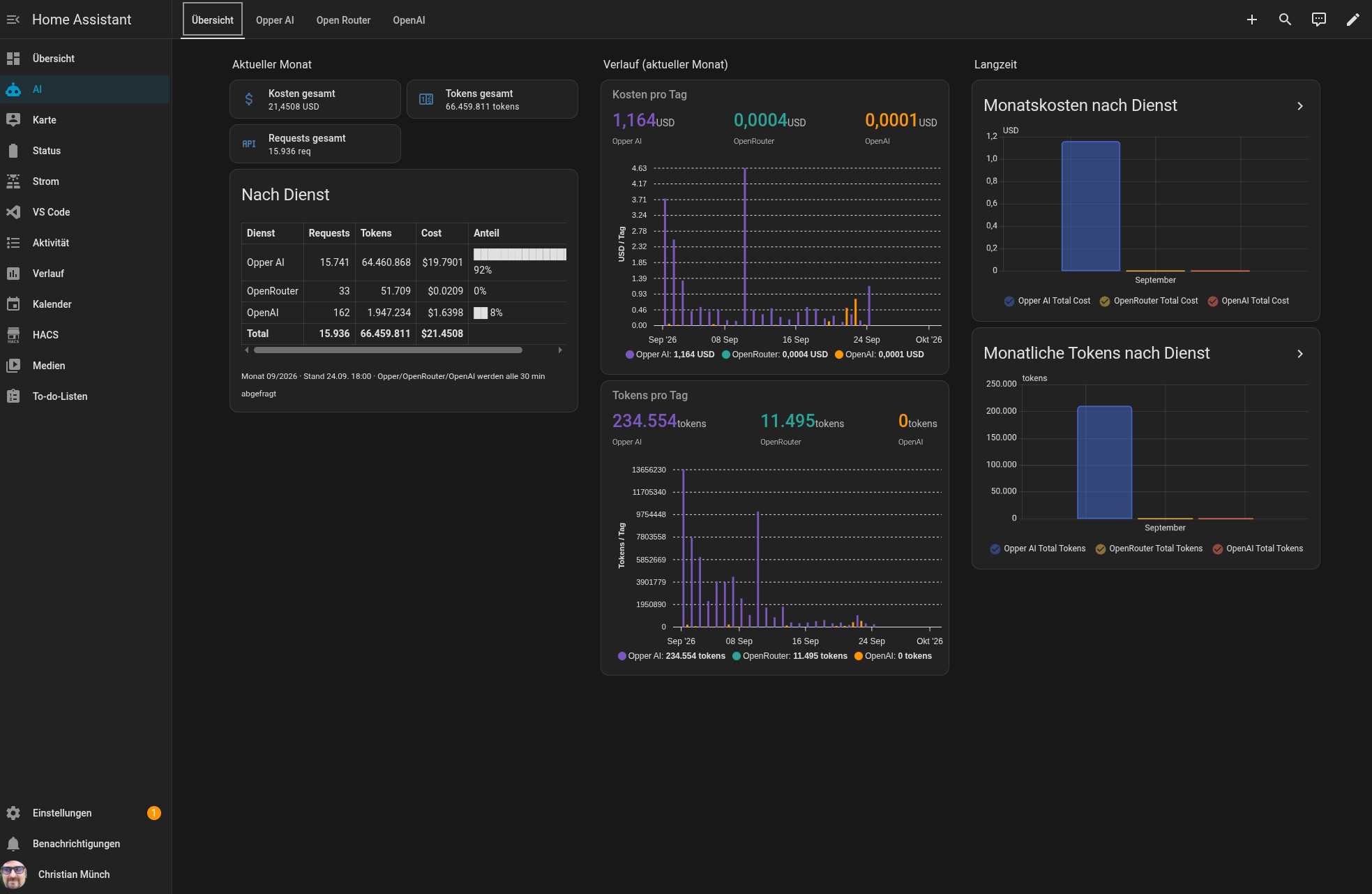
These metrics are interesting not just because they explain a bill. They can also trigger a concrete action. I set up a Home Assistant automation that notifies me through Discord when daily costs exceed US$10. There is a Discord integration and a script for sending the message for this purpose.
At this point, no generative AI is needed to decide whether costs are “high.” The threshold is clear: if the daily value exceeds it, a message is sent. That makes the rule easy to understand and predictable. AI was helpful when working on the configuration; during regular operation, an ordinary automation makes the decision.
For me, the sequence matters: first the data must be available, then I can visualize it usefully. Once measurements are reliable, understandable rules can be built on them. Without metrics, I would only be guessing whether a threshold had been reached. With an automation, I also do not have to hope that I happen to look at the right view at the right time.
The fact that Home Assistant logs to my Discord server also helps me notice messages outside the dashboard. A notification is not an end in itself. It should clearly state what happened and why I should pay attention. To begin with, a single threshold warning is better than a flood of messages that I eventually ignore.
Coding agents for the work that otherwise gets left undone
Claude Code and OpenCode helped me review and rework the existing Home Assistant configuration. Particularly in a system that has been in use for a while, tasks accumulate that each seem manageable on their own: standardizing views, finding old device references, removing duplicate cards, correcting labels, and building warnings consistently. Taken together, these tasks consume time that everyday life often uses up on other things.
A coding agent can analyze what is there, identify relationships, and implement proposed changes. That does not mean every suggested change is automatically correct. Home Assistant is connected to real devices and can therefore have real-world consequences. I treat the agents as tools for analysis and configuration work, not as autonomous house managers. Changes must remain traceable and be checked afterward. Particularly with switches and automations, it should be clear which entity is being addressed and what consequences an action has.
For me, the practical gain is not that AI makes every decision for me. It lowers the barrier to cleaning up a system that has grown over time. Tasks I kept putting off can be tackled more deliberately when an agent helps with searching and structuring. Responsibility for the changes and for operation still remains with me.
New information from existing integrations
Alongside the dashboard work, the information available from individual integrations has expanded too. After a Home Connect update, there are additional notices about low salt and rinse aid, as well as reminders for machine care and filter cleaning. A separate switch for the screen has been added for the television in the living room. For the photovoltaic system, another sensor shows how long monitoring data has been missing.
These are not major platform changes. They are additions within infrastructure that already exists. If an integration provides a useful new sensor, it can be added to a dashboard or used as an automation trigger. The prerequisite is that I notice the information and correctly understand its state.
Visibility is not troubleshooting
The rework did not eliminate every problem. The doorbell integration no longer provides a camera. One device was temporarily unreachable; the log contained around 530 timeout messages about it. There are also individual unreachable devices and still a detector with a weak wireless signal.
This does not contradict the improved dashboard. Quite the opposite: a good overview should not give the impression that everything is fine merely because the interface looks tidy. It helps make faults and outages easier to recognize. But the cause may lie with an integration, a device, the network connection, or another dependency. That needs to be investigated separately.
This boundary matters for AI too. An agent can help narrow down a problem using logs and configurations. But it cannot conclude that a device works reliably from a nicely formatted view alone. When data stops arriving, that state must remain visible as a problem rather than silently being treated as normal.
An approach you can apply to your own homelab
Perhaps the following steps will be interesting for your homelab too:
- Inventory existing data. What sensors, integrations and states are already available? Before buying new hardware, it is worth looking at what is already being collected.
- Organize for everyday usefulness. A good overview groups information by purpose and shows trends when history helps put things into context.
- Make warnings conditional. Only relevant deviations should demand attention. Constant status messages make you tune out.
- Measure first, automate second. A stable sensor value and a clear rule are a better foundation than a complicated automation built on uncertain data.
- Use AI for analysis and routine work. Coding agents can help search and clean up. Changes, particularly those with real-world consequences, must remain verifiable.
- Do not hide faults. A dashboard must not conceal problems. Outdated data, unreachable devices and integration errors need attention too.
My Home Assistant was already an important part of the homelab. The rework has made it more useful to me: information already in the system is easier to find, selected problems stand out sooner, and a new cost overview has led to a concrete Discord warning.
AI helped me tackle work for which I otherwise had little time. The automations deliberately remain understandable, and Home Assistant executes clearly defined rules. For me, the real value lies in the combination of existing infrastructure, visible metrics and verified AI assistance.
What data in your homelab or existing IT is already available, but not yet visible where it would really help you?