
Word is already spreading throughout the automation community: n8n 2.0 is just around the corner! The new version was recently announced in the official forum, and as with every major release, this update brings some exciting new features, but also breaking changes.
The beta is scheduled to be available as early as December 8. That is reason enough to familiarize yourself with the changes now and prepare your infrastructure.
Preparation Is Everything: The Migration Report
A major update can be intimidating, especially when complex workflows depend on it. The n8n team has thought ahead here, though. There is a built-in Migration Report directly in your n8n instance's backend under Settings -> Migration Report.
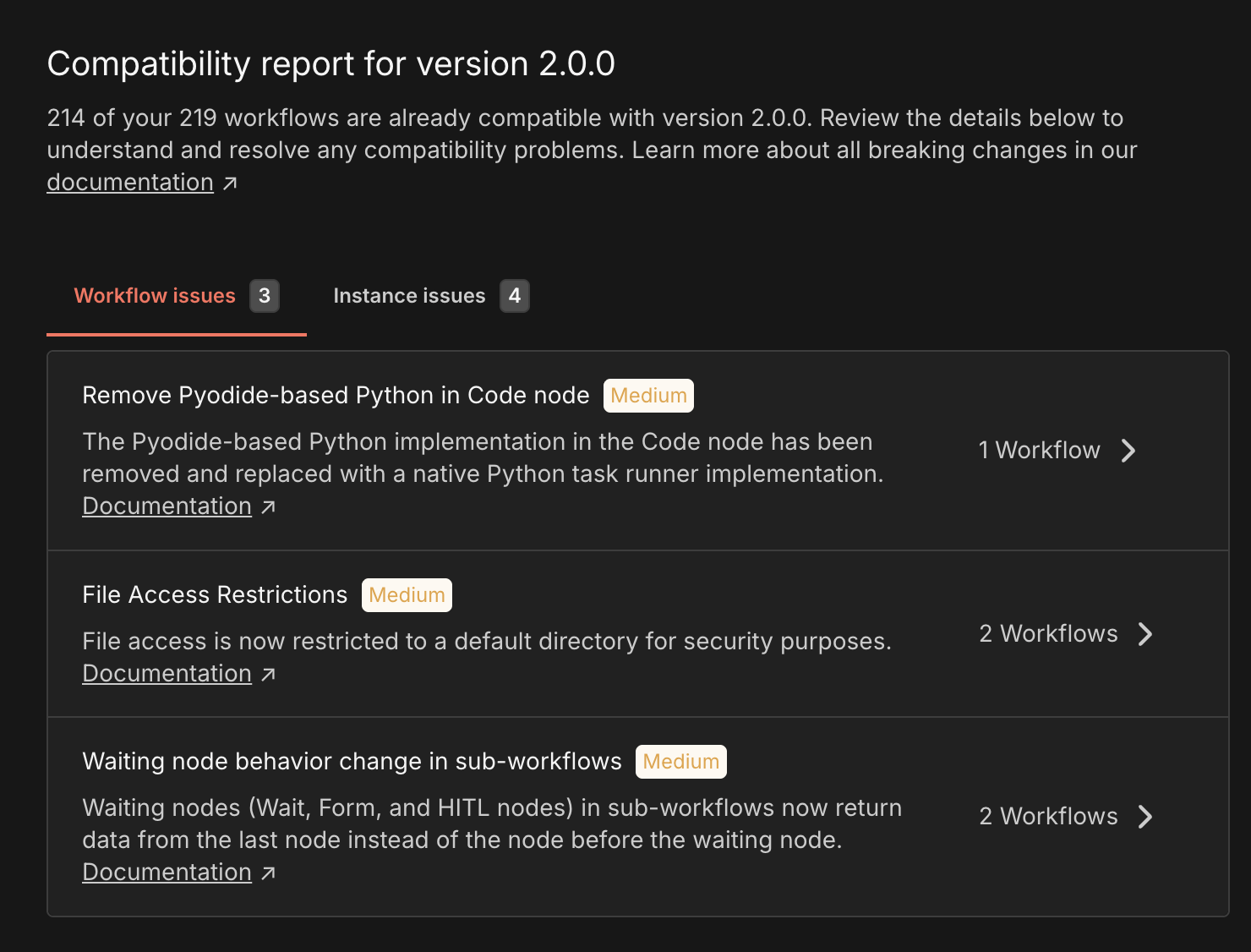
This report is your best friend for the update. It thoroughly checks your existing workflows and settings:
- Which nodes are incompatible?
- Which nodes are affected by changes?
- Which configurations need to be adjusted?
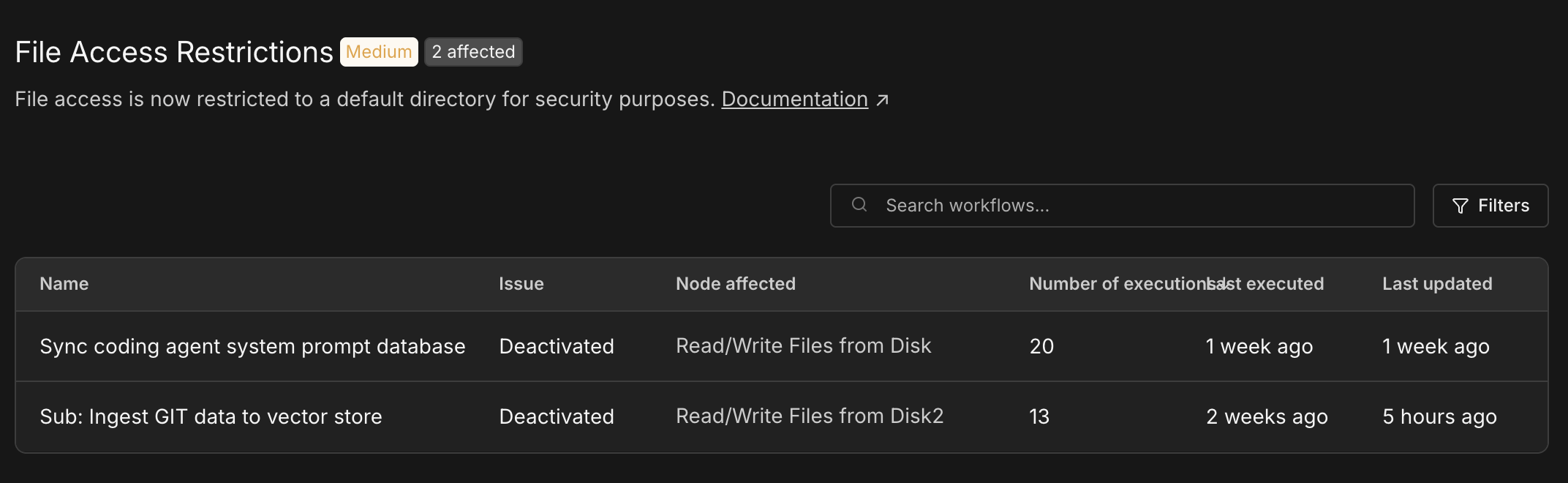
I recommend that everyone consult this report as early as possible to avoid nasty surprises during the update. You can also find a detailed overview of the changes in the official documentation on breaking changes.
Important Breaking Changes at a Glance
Alongside the architectural changes, there are some decisive cuts that primarily affect self-hosters. Here are the most important points from the documentation:
- No more MySQL/MariaDB support: n8n 2.0 discontinues support for MySQL and MariaDB as backend databases. If you are still using them, now is the time to migrate to PostgreSQL. MySQL support had already been marked as deprecated with the 1.0 release, though. Personally, I also much prefer Postgres.
- Access to environment variables: For security reasons, Code nodes can no longer access environment variables by default. If your scripts depend on them, you must either explicitly allow this through the variable
N8N_BLOCK_ENV_ACCESS_IN_NODE=falseor adapt your workflows. - Removal of the tunnel option: The startup option
--tunnel, often used for quick local tests with webhooks, has been removed without a replacement. - Cleanup of old nodes: Nodes for services that have already been discontinued or are obsolete have now been permanently removed from the core.
A Major Change for My Setup: External Task Runners
One of the most significant architectural changes in n8n 2.0 concerns code execution. The internal task runner, which previously executed Python or JavaScript code "out of the box", will no longer be active by default in version 2.0.
Instead, n8n now relies on external task runners. This means code is executed in a sandbox that is strictly separated from the main n8n instance. This has two major advantages:
- Security: The attack surface for hacks is drastically reduced. By default, nodes for "Git" or code execution are restricted, so that uncontrolled access to the file system, for example, is no longer possible. Of course, these restrictions can be relaxed through settings if you know exactly what you are doing.
- Flexibility: Do you need specific Python libraries or Node packages? You can simply build your own Docker image for the task runner and get exactly the environment you need without bloating the main instance.
My Setup: Task Runners in Worker Mode
Since I run my n8n setup in Worker Mode to distribute the load better, I had to make more extensive adjustments to my docker-compose.yaml. The challenge here is that not only the main container (webhook processor), but also the workers need access to task runners.
In my current configuration, which I am using to prepare for the transition, I have therefore defined dedicated task runner containers for the main process (n8n) and for the worker (n8n_worker).
Here is a look at my docker-compose.yaml as it is currently running:
x-n8n-task-runners: &service-task-runners-n8n
  image: ghcr.io/n8n-io/runners:1.122.1

x-n8n: &service-n8n
  image: ghcr.io/n8n-io/n8n:1.122.1
  env_file: .env
  networks:
    - default
  user: node
  volumes:
    - n8n-data:/home/node/.n8n
    - "./data:/data"
  restart: unless-stopped

services:
  n8n:
    <<: *service-n8n
    container_name: n8n
    ports:
      - 0.0.0.0:5678:5678
    depends_on:
      redis:
        condition: service_healthy
    env_file: .env

  n8n_worker:
    <<: *service-n8n
    container_name: n8n_worker
    command: worker --concurrency=6
    depends_on:
      - n8n
    env_file: .env
    environment:
      N8N_WORKER_MODE: "true"
      OFFLOAD_MANUAL_EXECUTIONS_TO_WORKERS: "true"

  n8n_main_task_runners:
    <<: *service-task-runners-n8n
    container_name: n8n_task_runners
    env_file: .env
    restart: unless-stopped
    environment:
      - N8N_RUNNERS_TASK_BROKER_URI=http://n8n:5679
      - N8N_RUNNERS_MAX_CONCURRENCY=5
      - N8N_RUNNERS_AUTO_SHUTDOWN_TIMEOUT=15
      - N8N_NATIVE_PYTHON_RUNNER="true"
    depends_on:
      - n8n

  n8n_worker_task_runners:
    <<: *service-task-runners-n8n
    container_name: n8n_worker_task_runners
    env_file: .env
    restart: unless-stopped
    environment:
      - N8N_RUNNERS_TASK_BROKER_URI=http://n8n_worker:5679
      - N8N_RUNNERS_MAX_CONCURRENCY=5
      - N8N_RUNNERS_AUTO_SHUTDOWN_TIMEOUT=15
      - N8N_NATIVE_PYTHON_RUNNER="true"
    depends_on:
      - n8n_worker

  redis:
    container_name: n8n_redis
    image: redis:8-alpine@sha256:5013e94192ef18a5d8368179c7522e5300f9265cc339cadac76c7b93303a2752
    restart: unless-stopped
    networks:
      - default
    volumes:
      - redis-data:/data
    healthcheck:
      test: ['CMD', 'redis-cli', 'ping']
      interval: 5s
      timeout: 5s
      retries: 10

volumes:
  n8n-data:
  redis-data:
For now, I have added the following extra variables to my .env file:
# Task Runners
N8N_RUNNERS_AUTH_TOKEN=<xxxxxxxxxx>
N8N_RUNNERS_ENABLED=true
N8N_RUNNERS_MODE=external
N8N_RUNNERS_BROKER_LISTEN_ADDRESS=0.0.0.0

# Auth
N8N_SKIP_AUTH_ON_OAUTH_CALLBACK=false

# Git
N8N_GIT_NODE_DISABLE_BARE_REPOS=false

N8N_RESTRICT_FILE_ACCESS_TO=/data

# Allow all excluded nodes
NODES_EXCLUDE="[]"
For now, I have chosen these settings so that my workflows can continue running after the update. I have a few nodes that execute Bash commands directly. In my setup, though, they only work inside the container in the /data directory anyway.
As you can see, I have defined n8n_main_task_runners and n8n_worker_task_runners, each connected to its corresponding n8n service through N8N_RUNNERS_TASK_BROKER_URI. Whether this is the absolutely optimal solution for every scenario will become clear in practice, but it is a working approach to implementing the new architecture in Worker Mode.
New Features: More Convenience for Workflow Builders
Alongside the technical changes under the hood, there are also visible improvements that make working with n8n more pleasant:
- Improved canvas: The workflow editor (canvas) gets a fresh look and feel that appears more modern and tidier (unfortunately, I have not seen a screenshot yet).
- New sidebar: The sidebar has been reworked to improve navigation and access to important features. I am curious whether the sidebar will also get a function in the community version,
- Autosave (coming soon): Finally! One of the most requested features is coming. Automatic workflow saving will be introduced shortly after the stable release. No more lost work because you forgot to click "Save". The feature sounds simple, but behind the scenes, it is not.
Conclusion
The move to n8n 2.0 is an important milestone that brings improvements, particularly in security and stability. Anyone running complex setups should use the time before the release to adjust their docker-compose configuration and use the migration tools.
There cannot really be a proper conclusion yet, since the version is not here yet.
I am looking forward to December 8!