
At home, I use a RabbitMQ server to write certain tasks from my Node-RED into queues so that they can be processed asynchronously.
Some of the data should be retained permanently.
Today, I noticed that the connection to RabbitMQ was not shown as active in my RabbitMQ. I was effectively offline.
Troubleshooting
A look at the server showed me that I had not set a correct restart policy in the docker-compose.yml.
After adding restart: unless-stopped and running docker compose up -d, the server was running again.
But the Node-RED server still showed no connection. So I quickly opened the logs on the RabbitMQ server. And there it was: the credentials did not match.
rabbitmq  | 2022-04-07 14:12:20.054369+00:00 [info] <0.963.0> accepting AMQP connection <0.963.0> (192.168.1.168:45000 -> 192.168.1.175:5672)
rabbitmq  | 2022-04-07 14:12:20.058424+00:00 [erro] <0.957.0> Error on AMQP connection <0.957.0> (192.168.1.168:44996 -> 192.168.1.175:5672, state: starting):
rabbitmq  | 2022-04-07 14:12:20.058424+00:00 [erro] <0.957.0> PLAIN login refused: user 'nodered' - invalid credentials
rabbitmq  | 2022-04-07 14:12:20.060832+00:00 [erro] <0.960.0> Error on AMQP connection <0.960.0> (192.168.1.168:44998 -> 192.168.1.175:5672, state: starting):
rabbitmq  | 2022-04-07 14:12:20.060832+00:00 [erro] <0.960.0> PLAIN login refused: user 'nodered' - invalid credentials
But how could that be?
So I logged into RabbitMQ's management interface. And what did I see?
The user and VHost I had created in RabbitMQ were gone again.
So I quickly recreated everything in the admin interface. My Node-RED could access RabbitMQ again right away.
This time, though, I was wiser and restarted RabbitMQ once to be on the safe side. And what did I see? The data was gone again.
My docker-compose.yaml looked like this:
version: "3.2"
services:
  rabbitmq:
    image: rabbitmq:3-management-alpine
    env_file: rabbitmq.env
    restart: unless-stopped
    ports:
        - 5672:5672
        - 15672:15672
    volumes:
      - ./volumes/data:/var/lib/rabbitmq
I had followed the instructions to the letter. Why was all the data always gone?
The volume was being loaded correctly too.
Getting to the bottom of it
But then it dawned on me. The RabbitMQ server always builds the path to its database using the hostname. In Docker, unless you specify anything, that is always the container ID.
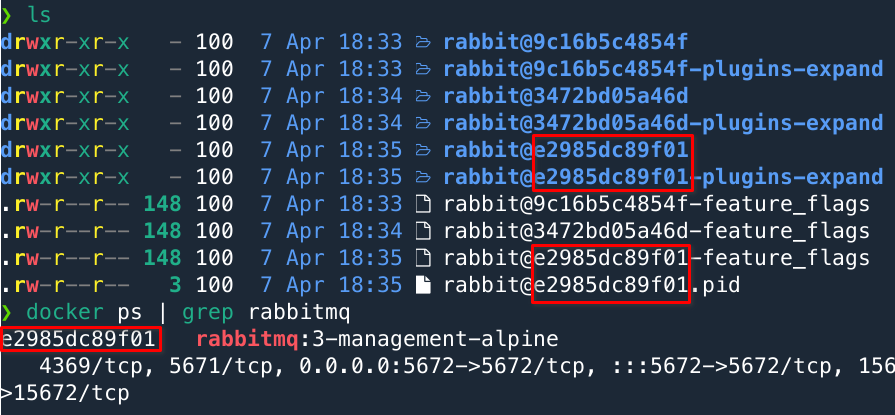
Whenever the container is recreated, it effectively creates a new database. This means the data on my RabbitMQ server is still physically present but is no longer loaded. And you generate data junk in the process.
The solution was relatively simple for me. I just set a fixed hostname.
version: "3.2"
services:
  rabbitmq:
    # Fester Name
    hostname: rabbitmq

    # ...

There, that works now.
When the container is recreated now, the data is still retained.
If anyone has a better idea, or if there is a good configuration setting for this, let me know.