Change the Admin URL
The first measure that should be taken for every shop in a live environment is changing the admin URL. This can conveniently be changed in the system configuration under "Admin -> Admin Base URL".
Simply set "Use Custom Admin Base URL" to "Yes". You can then enter the URL in the text field that appears.
The base URL should start with "https://". I am taking the SSL certificate for a live shop as a given here.
If access should only be possible from your own company network or from certain IPs, access to the admin login can be further secured through a web application firewall. Access to certain URLs can also be restricted through the web server.
Limit Permissions
If several users are working in the shop's admin area, their permissions should be configured very carefully. Each user should only receive the permissions they actually need.
In a multistore environment running Magento Enterprise Edition, permissions can additionally be restricted to individual websites.
Having multiple users share a login should be avoided at all costs. It must be possible to trace exactly who changed what in the shop and when.
If the Enterprise Edition is in use, the admin action log can help here. For the most important data, the admin action log provides a kind of audit trail that allows changes to be traced afterward as well.
Limiting user permissions has the additional benefit that users only see menu items they are allowed to use. This also improves usability.
Restricting permissions applies to web services as well. These can access the shop's data externally through the Core API. If web services are enabled, the same rule applies: only grant the permissions actually needed by a third-party provider, for example.
Two-Factor Authentication
A fairly new option is two-factor authentication. This adds another factor to the admin login.
Google offers one option through its authentication service. A free Magento module is described in "Door 12" of the Webguys Advent calendar.
If you do not trust Google and would rather use an open-source option or your own authentication server, you can install the N98_Yubikey module I developed.
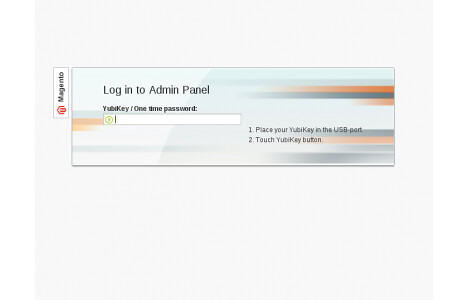
After installing the module, the authentication method needs to be enabled and the ID of the Yubikey assigned to a user.
As soon as a user logs in with their username and password, they are additionally asked for a one-time password. The user then presses the button on their Yubikey, and a 44-character password is generated and sent to the shop. The shop checks it against the Yubikey server and, if successful, redirects the user to the admin area.
The great thing about Yubikeys is that you can use your own authentication server. The URLs of the servers can be entered in the Magento configuration. This means I no longer have to rely on Google, for example. Another advantage is the unbeatable price of 25 dollars per Yubikey.
If you would like to try the module, you can get it through Magento Connect:
The development version, including a short guide, can be found on github.