
Via Vagrant / Puppet
At the second-to-last PHPUG Rheinhessen meeting, I had already presented an automatic Magento installation using Vagrant and Puppet. This makes it possible to spin up a complete virtual machine with Magento within minutes.
That is great when you quickly need a truly empty system. There is no magic involved, because Magento already provides the option of installing from the command line through install.php without opening the interface.
If you are interested, just have a look at https://github.com/cmuench/Magento-Vagrant-Puppet and clone the Puppet modules, including the Vagrant file.
MageSpawner / Magento-Phing-Installer
Last week Matthias Zeis released his MageSpawner. MageSpawner is a shell script that also installs Magento in the same way. In his blog post, Matthias suggested that someone could also convert his shell script into a build script. Since I had already intended to do this myself some time ago, I have now actually done it.
You can take a look at the result at https://github.com/netz98/Phing-Magento-Installer.
The script requires the following:
- Linux / MacOS (not tested)
- wget
- sed
- MySQL client tools
- tar (for extracting)
- phing
Phing can quickly be installed through Pear.
The installer is contained entirely in the build.xml file. Before running the script, the supplied build.properties.sample file needs to be renamed to build.properties. The corresponding configuration in the property file then needs to be adjusted, such as your system's paths or database credentials.
After that, you are ready to go.
The script has two important targets.
- install
- uninstall
They are called as follows:
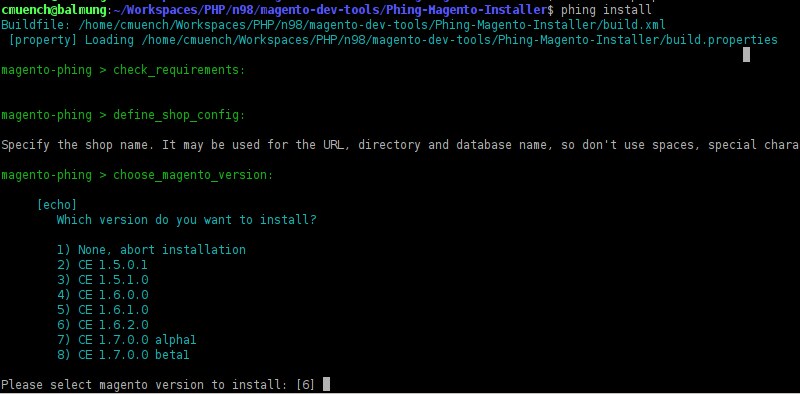
phing -f build.xml install and phing -f build.xml uninstall
The script works in the same way as Matthias Zeis's script, and here, too, you only enter the first part of the base domain defined in the configuration.
If the shop is to be created at foo.magento.local, the following entry must exist in the configuration:
mage.domain = magento.local
Then start the installation. When asked for the "Shop Name", you only enter "foo". After selecting the target system, Magento is installed fully automatically.
What comes next? The following things are still planned for the script in the future...
- Sample data installation
- Magento Enterprise Edition support