Since I am working more and more with the Oracle database server at my employer netz98, I thought I would simply install the free Oracle Express Edition.
Here is a short description of how I went about it. First I got the software from Oracle's website. The software was easy to find, but you can only access it with an Oracle account.
That was not a problem for me, since I was already registered.
To my surprise, Oracle offers its Linux installation packages as both RPM and Debian packages. Since I wanted to run the database on an Ubuntu system installed with VMWare, I chose the Debian version. So I downloaded the package and simply double-clicked it. Installation started, but aborted because there was not enough swap space. The database is only installed if twice the amount of RAM is available as swap. Damn, I had underestimated the swap space. So I quickly shut down the VMWare instance and added a new hard drive. Then I booted the server again and installed parted and gparted as a frontend to create new partitions conveniently. After changing the swap partition in fstab and rebooting, I could run the installation again.
This time the installation completed successfully.
You can start configuring the database server with /etc/init.d/oracle-xe configure. Here I simply accepted all the default settings for ports and so on. All I had to do was set the admin password, and the database was configured.
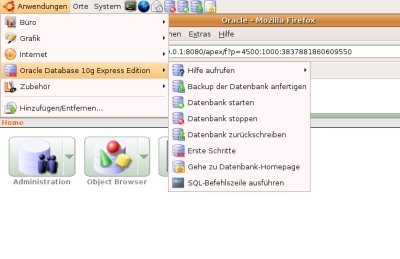
To my surprise, Oracle had also installed the necessary menu entries in my Ubuntu instance.
After clicking "Go to Database Home Page," Firefox opened a nice login screen for a web-based database tool. Which username and password should I use?
A look at the online help cleared that up. The username has to be "SYSTEM," and the password is the same one I had set during configuration.
Unfortunately, login did not work. The password was probably too long and had been truncated somewhere. So I ran the configuration program again. The program (a shell script) immediately greeted me with the error message "Oracle Database 10g Express Edition is already configured". As a curious programmer, I naturally opened the init script straight away and searched for the error message. After commenting out the line, I could run the configuration again.
I quickly reset the password, and lo and behold, the new (shorter) password worked.
That was the end of the problems. If I had to install another Express Edition, it would naturally take only 10–20 minutes.
Conclusion: after a few teething problems, a success after all.