If you run your own homelab or several servers, Uptime Kuma is a popular choice for uptime monitoring: lightweight, self-hosted, and equipped with attractive status pages. However, I was missing a native, unobtrusive way to see the overall status of my services at a glance on my desktop, without keeping a browser tab or web app open all the time.
That is why I created the Uptime Kuma Plasma Widget — a native plasmoid for the KDE Plasma desktop.
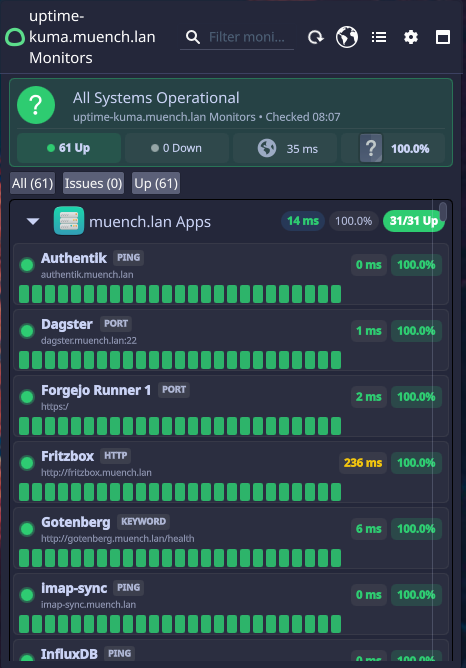
🎯 What the Widget Does
The widget integrates seamlessly into the KDE panel or directly onto the desktop and queries a configured Uptime Kuma instance at regular intervals:
- Status at a glance: A compact panel icon immediately indicates the overall state (everything green versus at least one service down).
- Detailed popup: Clicking the widget opens a compact overview of individual monitors or the status page, with current latency and availability information.
- Native desktop integration: As a QML-based plasmoid, the widget respects the selected Plasma color scheme and desktop scaling.
- Lightweight: No heavy Electron app or open browser window is needed in the background.
⚙️ Installation & Setup
1. Installation Through the KDE Store (Recommended)
You can install the plasmoid directly through KDE Plasma's built-in extension manager without opening a terminal:
- Right-click the panel (or desktop) and select Add Widgets….
- At the bottom of the sidebar, click Get New Widgets… ➔ Download New Plasma Widgets….
- Search for
Uptime Kuma. - Click Install for the Uptime Kuma Plasma Widget.
- Drag the widget to the desired location in your panel or on your desktop.
(Alternatively, you can find the package directly on store.kde.org or in Discover under Plasma extensions.)
Manual Installation (For Developers & Source Code)
If you want to test the latest development version or contribute changes, you can clone the repository directly and install it using kpackagetool6:
git clone https://github.com/muench-dev/uptime-kuma-plasma-widget.git
cd uptime-kuma-plasma-widget
kpackagetool6 -t Plasma/Applet -i .
Code
You can find the code on GitHub: