
I have been working on Fedora for years. Linux is not an experiment for me; it is everyday life. That made it all the more frustrating that Anthropic officially offers Claude Desktop only for macOS and Windows. For Linux: nothing.
My colleague at valantic, Patrick Schönfeld, did not simply accept that. He is an AI expert, an open-source enthusiast – and someone who would rather solve problems than talk about them.
The result: claude-desktop-bin
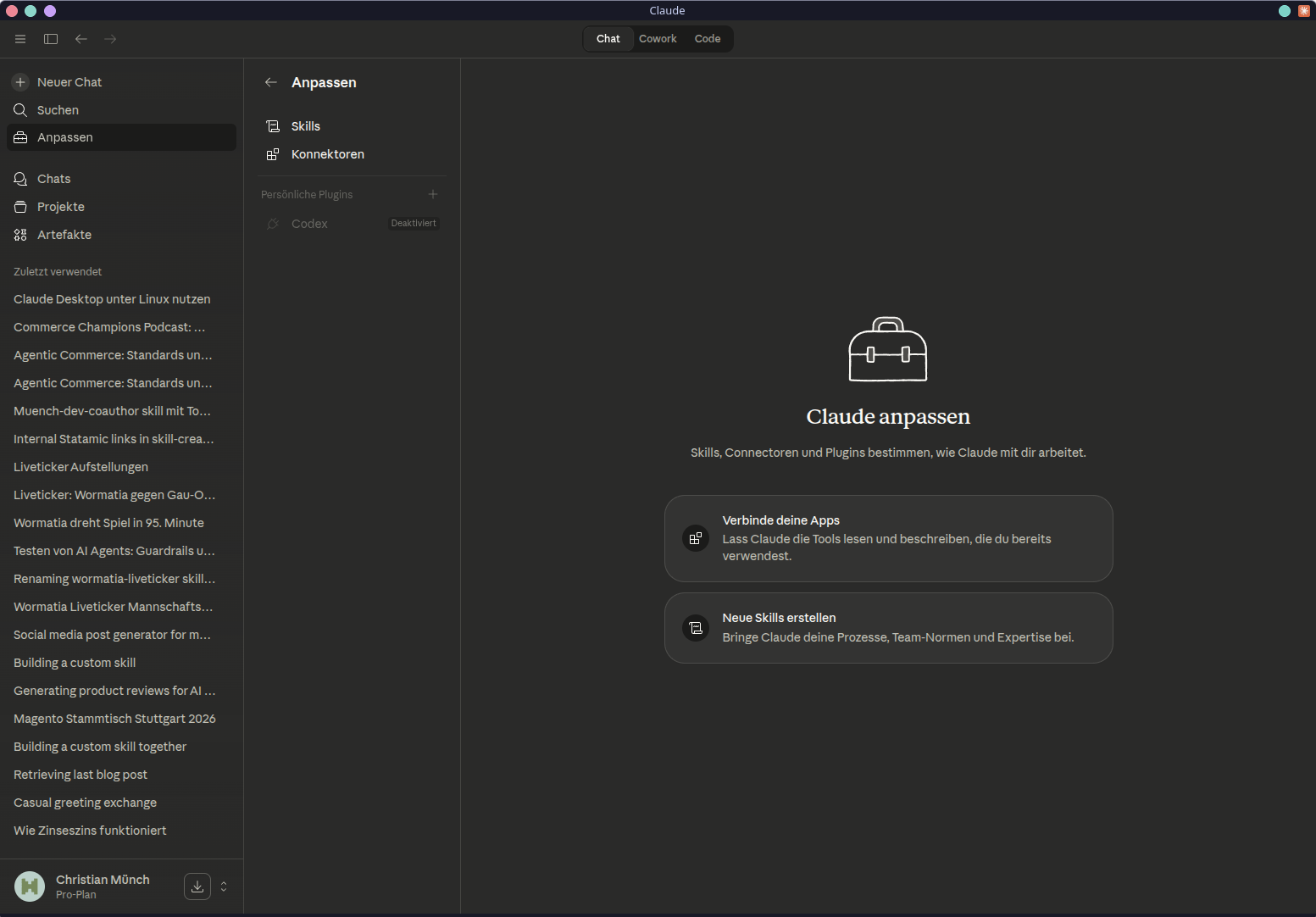
Here is a screenshot of my Fedora desktop
Installation: For every distribution
Patrick really has considered all the major distributions. No half-baked single-distro port.
Arch Linux / Manjaro
yay -S claude-desktop-bin
Updates arrive automatically through the AUR helper – nothing else to do.
Debian / Ubuntu
The recommended approach using the APT repository includes automatic updates:
curl -fsSL https://patrickjaja.github.io/claude-desktop-bin/install.sh | sudo bash
sudo apt install claude-desktop-bin
If you do not want to execute someone else's installation script – which is a perfectly legitimate position – download the .deb directly from the releases:
wget https://github.com/patrickjaja/claude-desktop-bin/releases/latest/download/claude-desktop-bin_1.1.5749-1_amd64.deb
sudo dpkg -i claude-desktop-bin_*_amd64.deb
Fedora / RHEL
wget https://github.com/patrickjaja/claude-desktop-bin/releases/latest/download/claude-desktop-bin-1.1.4088-1.x86_64.rpm
sudo dnf install ./claude-desktop-bin-*-1.x86_64.rpm
NixOS
# Ausprobieren ohne Installation
nix run github:patrickjaja/claude-desktop-bin

# Dauerhaft ins Profil
nix profile install github:patrickjaja/claude-desktop-bin
If you want to add it directly to the system configuration:
{
  inputs.claude-desktop.url = "github:patrickjaja/claude-desktop-bin";

  environment.systemPackages = [
    inputs.claude-desktop.packages.x86_64-linux.default
  ];
}
AppImage (everyone else)
wget https://github.com/patrickjaja/claude-desktop-bin/releases/latest/download/Claude_Desktop-1.1.5749-x86_64.AppImage
chmod +x Claude_Desktop-*-x86_64.AppImage
./Claude_Desktop-*-x86_64.AppImage
Cowork on Linux
Cowork is Anthropic's agentic workspace feature – file operations, desktop automation, task management directly from the desktop. Here, too: officially no Linux support.
Patrick reverse-engineered the Windows service and made it run on Linux. The project: claude-cowork-service
The service is optional. Claude Desktop works without Cowork too. If you want it:
# Schnellinstallation, jede Distribution
curl -fsSL https://raw.githubusercontent.com/patrickjaja/claude-cowork-service/main/scripts/install.sh | bash

# Arch Linux per AUR
yay -S claude-cowork-service
systemctl --user enable --now claude-cowork
The prerequisite is the Claude Code CLI – it must be installed and available in the path. The paths /usr/bin/claude, ~/.local/bin/claude and /usr/local/bin/claude are detected automatically.
What is behind it
This is not a quick port. The package contains a whole range of targeted patches that turn Claude Desktop – an Electron app developed primarily for macOS – into a functional Linux application. Tray icon integration, DBus handling, MCP server support, Computer Use via xdotool and scrot – it is all there.
An automated CI job checks daily for new Claude Desktop versions, validates all patches in Docker and ensures that only working builds make it into the AUR. That is solid work.
A note for Wayland users: The global shortcut (Ctrl+Alt+Space) works only under X11. If you are using a Wayland compositor, start Claude Desktop like this:
claude-desktop --ozone-platform=x11
This can also be added permanently to the .desktop file.
Conclusion
By now, it is a familiar pattern: a vendor ignores Linux, and the community or dedicated developers such as my colleague Patrick step in.
Thank you, Patrick – for the work that went into this. The result is genuinely useful.
Have you tried Claude Desktop on Linux yet? Which distribution are you running it on?
Update April 7, 2026
I revised the text again after feedback from Patrick. For RPMs and AppImage, I had written that there were no automatic updates. That was not correct. Patrick has provided automatic updates for these installations as well.