
Anyone who has been around the Magento ecosystem over the past 15 years may know me through the tool n98-magerun. It is the "Swiss Army knife" for Magento developers and administrators, working directly on the server or in the local environment. But the world of e-commerce hosting has evolved massively.
With the rise of cloud-native architectures, we now often face an entirely new challenge: we are standing in front of a locked door.
The intention: When the shell becomes a dead end
My goal with n98-magerun2 has always been to give developers maximum efficiency on the console. But in modern environments such as Adobe Commerce as a Cloud Service (SaaS) or highly secured Kubernetes clusters, there is often simply no SSH access anymore. Security policies and compliance requirements block direct access to the server or database.
This is where the idea for mage-remote-run emerged. The intention was not to replace n98-magerun2 – it remains indispensable for local work with tools such as DDEV, since it can operate directly within the system. Instead, the vision was to create a tool that also works remotely. It was supposed to work with all my Magento instances. It was supposed to work without a lot of setup.
The idea: API-first instead of shell-first
Mage Remote Run takes a radical API-first approach. Rather than attempting to execute code within the infrastructure, the tool communicates with the shop from the outside through standardized HTTPS and REST interfaces.
The core concept rests on three pillars:
- Remote-first management: Full control over products, orders and system configurations, without any shell access.
- Platform-agnostic: It does not matter whether the instance runs in Adobe Commerce Cloud as SaaS or PaaS, at a specialized hosting provider with Magento Open Source, or as a Mage-OS instance.
- Modern distribution: As a Node.js-based tool, it is decoupled from the local PHP environment and integrates seamlessly into modern workflows.
- Manage multiple instances: Connections to multiple instances can be configured.
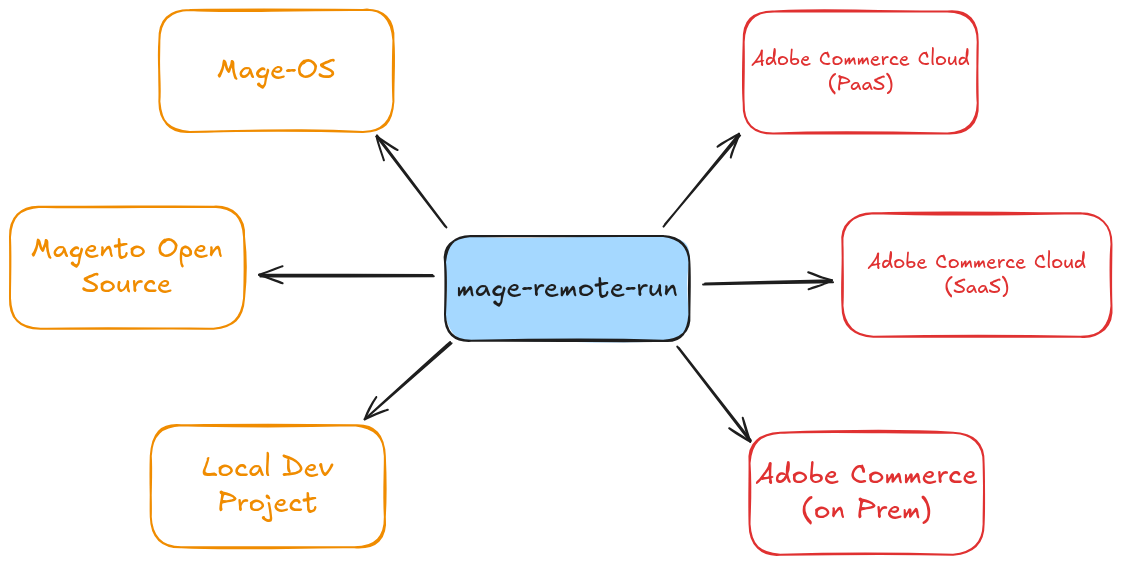
Isn't there a catch?
The concept has just one catch. It is limited to what the API can do. If the API does not offer a function, I cannot call it either.
With the emergence of a pure SaaS solution such as Adobe Commerce as a Cloud Service, however, it is inherently no longer possible to make changes directly to the backend code. Adobe itself therefore has to make sure that as many functions as possible are covered by the API.
With the PaaS version or on-premises systems, the API can of course still be extended. The tool will not necessarily know about special endpoints you have created yourself.
For this case, I created a generic "rest" command that makes it very easy to call any endpoint using the currently configured connection.
Premiere at the Adobe Commerce APAC User Group event
I am particularly pleased that I had the opportunity to officially introduce Mage Remote Run for the first time at the Adobe Commerce APAC User Group on February 5, 2026. Under the title "Architecting Remote Operations", I was able to show the community how we can bridge the gap between the local developer experience and restrictive cloud environments.
The video of the session, including the complete live demo, is embedded here:
::youtube
In the video, I also cover a few use cases and show how to import products with the tool or use it in a GitHub Action.
A look into the future: AI and MCP
A central part of my vision is preparing for a world where we do not control systems solely through manual commands. By supporting the Model Context Protocol (MCP), Mage Remote Run is already "AI-ready". It allows AI agents to access shop data securely and perform administrative tasks through natural language. In general, however, this feature should still be used with caution. There is currently no way to restrict it to read-only commands either.
Example:
mage-remote-run rest V1/products -m GET --page-size 1 --current-page 1 --format json
Want to give it a try?
All you need to run the tool is a reasonably recent NodeJS installation. Once you have that, using it is very straightforward.
npm install -g mage-remote-run
Or sandboxed:
npx mage-remote-run
Documentation is available here: https://mage-remote-run.muench.dev
Have fun trying it out!
Update – April 16, 2026
There is now another video about mage-remote-run. If you prefer seeing the tool in action to reading documentation, I recommend taking a look: