
The world of artificial intelligence is developing rapidly, and we are at the beginning of a new era of virtual assistants that not only increase efficiency but also revolutionize the way we interact with technology. Over the holidays, I invested a lot of time and passion in my AI agent infrastructure project.
Developing, and above all experimenting, was a lot of fun. With Pydantic AI, I created the foundation for a stable agent that is a true all-rounder. In this post, I want to give you an insight into the progress of my AI agents, how I have expanded my infrastructure, and what else I am planning.
From Prototype to Stable Application
In developing my AI agents, I have focused on versatility and stability. I first created a prototype with n8n (see blog post) and then, with working prompts, ported the agent to a Python application. I used Pydantic AI for this to ensure my agents' type safety and flexibility.
In Pydantic AI, I then created individual tools that can be used by one agent or (later) by several agents.
My Pydantic AI agent can not only create code snippets in my Filebin, but also access my Postgres database directly, research information on the internet, and communicate with my document management system (DMS). The goal here is to integrate all kinds of services from my homelab. The agent can already use some API endpoints from my API server or send emails. You also have to keep an eye on security here, but that is another topic for a separate blog post.
By now, a very respectable infrastructure has developed that allows me to manage and monitor the agents efficiently.
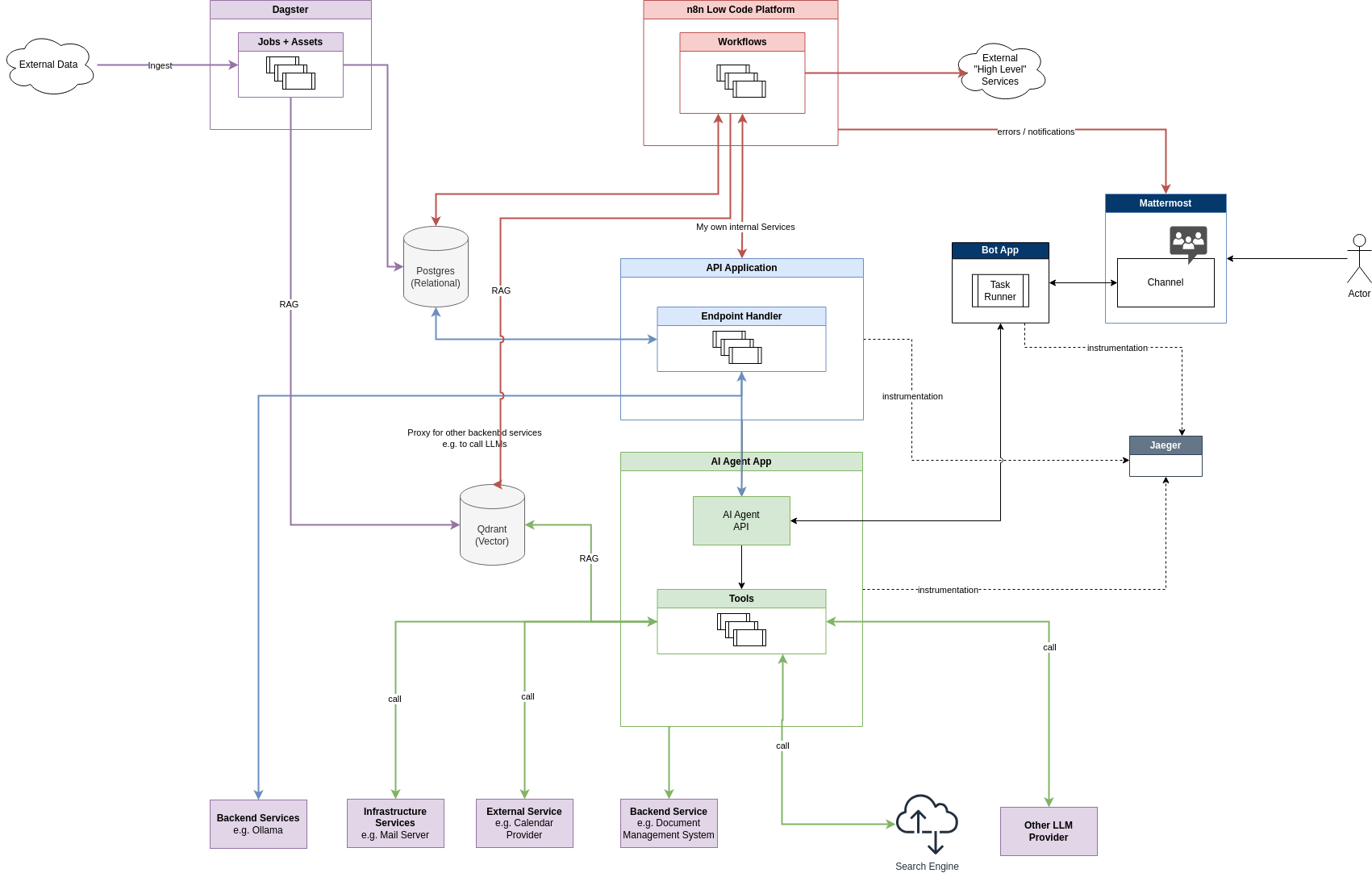
The goal is to automate routine tasks and save valuable time in life for more important things.
Pydantic AI
Pydantic provides a great logging framework (Pydantic Logfire) and an agent framework (Pydantic AI), which allow me to manage complex processes and data flows efficiently. The type safety Pydantic offers is particularly helpful, as many large language models (LLMs) are based on Python code.
It is fascinating to see how well LLMs can interpret Pydantic models directly.
For example, the Langchain Structured Output Parser also uses Pydantic models to structure its output.
You can easily test this principle manually in a prompt yourself by simply expressing the desired output format as a code snippet with a Pydantic model. This works directly in the ChatGPT interface.
Example (Shared ChatGPT):
Create a list of user and follow the structure:

class Address(BaseModel):
    street: str
    city: str
    postal_code: str

class User(BaseModel):
    name: str
    email: str
    addresses: List[Address]


Print only the user list.
Pydantic AI uses exactly this principle itself to achieve stable, type-safe output. If necessary, it also validates the output and instructs the AI to make a correction. Pydantic AI handles this very well (unsurprisingly), because who knows Pydantic models better than the developers themselves?
Pydantic is also compatible with more than just OpenAI's models, which provides some reassurance that you will not end up with vendor lock-in, as I currently see very often with other solutions. I try to mix things up a little more myself, sometimes using Groq (super-fast AI!), Google, or my own Ollama models. At the moment, I have embeddings generated exclusively by Ollama on my own hardware. It does not always have to be just OpenAI.
What Does a Pydantic AI Agent Look Like?
A Pydantic AI agent consists of an agent object containing the configuration and the tools the agent should use. Here is an abbreviated code example showing how my agent is currently initialized:
import os
from dataclasses import dataclass
from httpx import AsyncClient
from pydantic_ai import Agent

from .tools.basic import current_datetime_tool, weekday_tool
# ...

@dataclass
class Deps:
    client: AsyncClient

    muench_dev_api_key: str | None

    # .... more deps


async def get_deps() -> Deps:
    async with AsyncClient() as client:
        return Deps(
            client=client,

            # api.muench.dev API
            muench_dev_api_key=os.getenv('MUENCH_DEV_API_KEY', 'default-muench-key'),

            # ... more deps
        )

agent_cmuench = Agent(
    'openai:gpt-4o-mini',
    deps_type=Deps,
    retries=2,
    tools=[
        # Basic
        current_datetime_tool,
        weekday_tool,

        # Muench.dev
        get_weather_in_worms_tool,
        crawl_website_as_markdown_tool,
        #summarize_url_tool,

        # n8n
        list_n8n_workflows_tool,

        # ... more tools
    ],
    system_prompt=(
        # language and Style
        'Be concise. Reply friendly.',
        'Answer in the same language then me.',

        # Personal
        'You are my (Christian Münch) personal Assistant.',

        # more ...

    )
)
There is also the option of working with annotations. In my case, I decided against that because I wanted to keep the tools a little more modular. This way, I can easily swap out or add a tool. Reusing tools is also easier this way.
But that is a matter of taste too. If the agent is not so complicated, I can see the appeal of the annotation-based style as well.
Examples of tools and different agents can also be found in the official Pydantic AI documentation.
https://ai.pydantic.dev/examples/
The Idea of an Agent Network
An exciting next goal in my project development is to connect my agents. Here, I am focusing on the Pydantic AI agent, which is intended to act as a link between different agents. I plan to use an agent in n8n to create a kind of network in which specialized agents can carry out their tasks.
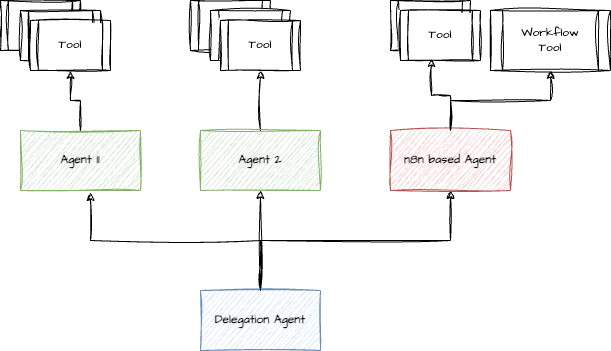
n8n is particularly advantageous because it offers over 200 pre-built integrations that make connecting external services easier. Using webhooks allows me to start workflows and AI agents externally and provides maximum flexibility.
Data Preparation with Dagster and n8n
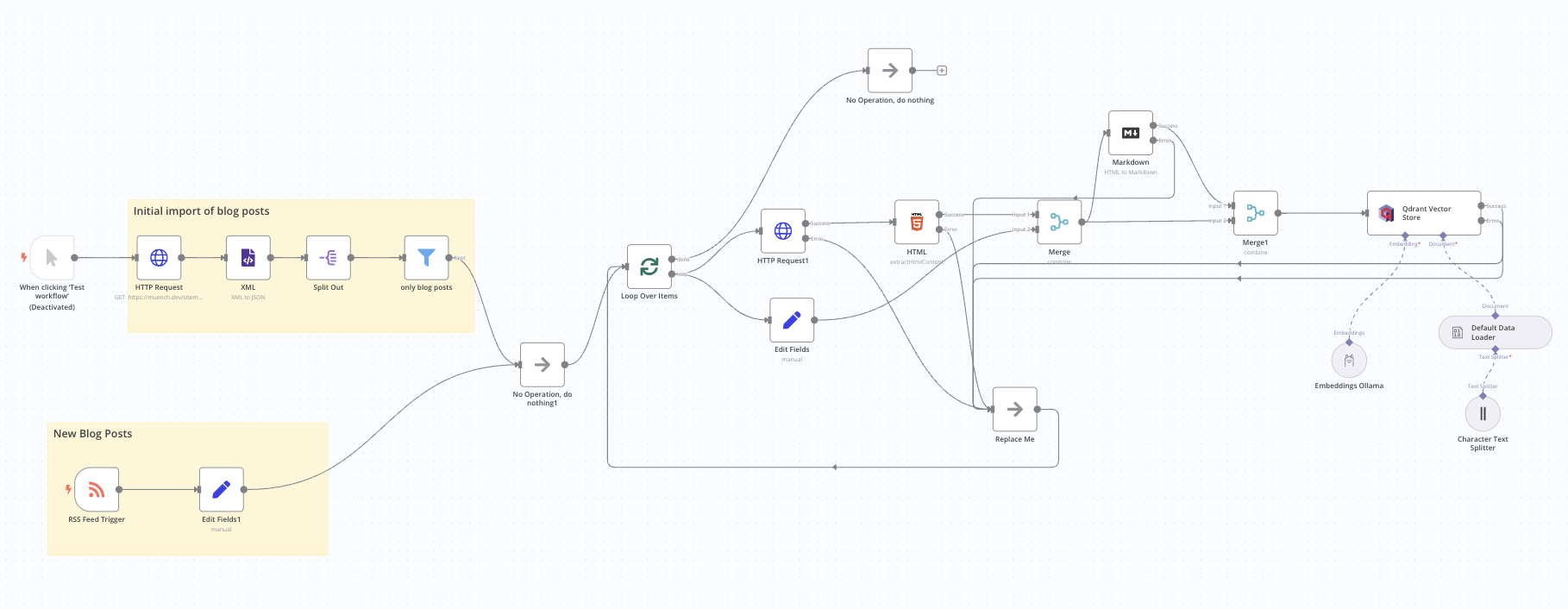
Another important aspect of my AI agent infrastructure is effective data preparation. Dagster and n8n come into play here. While Dagster is responsible for processing larger volumes of data, I use n8n for smaller, event-driven data processing. This combination allows me to play to both tools' strengths and significantly increase the efficiency of my data processing.
The example here shows how I insert my website's blog posts into a Qdrant database. New blog posts are reported directly by n8n's RSS Feed Trigger node, and the workflow starts automatically for the new blog post.
Interacting with the Agent
I access my agent through an API that I implemented with FastAPI, or through a Mattermost bot. The latter not only maintains the chat history but also stores the context of conversations, which is helpful for follow-up questions.
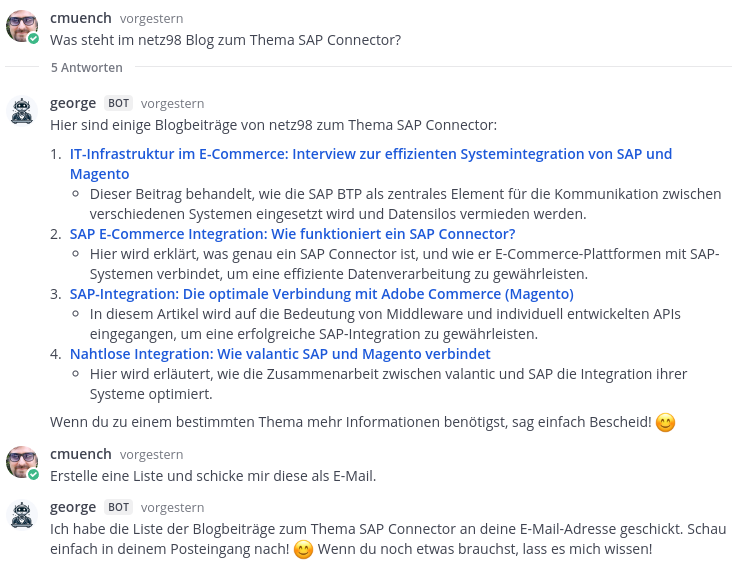
The Mattermost bot application calls the agent application's API and starts the corresponding processes.
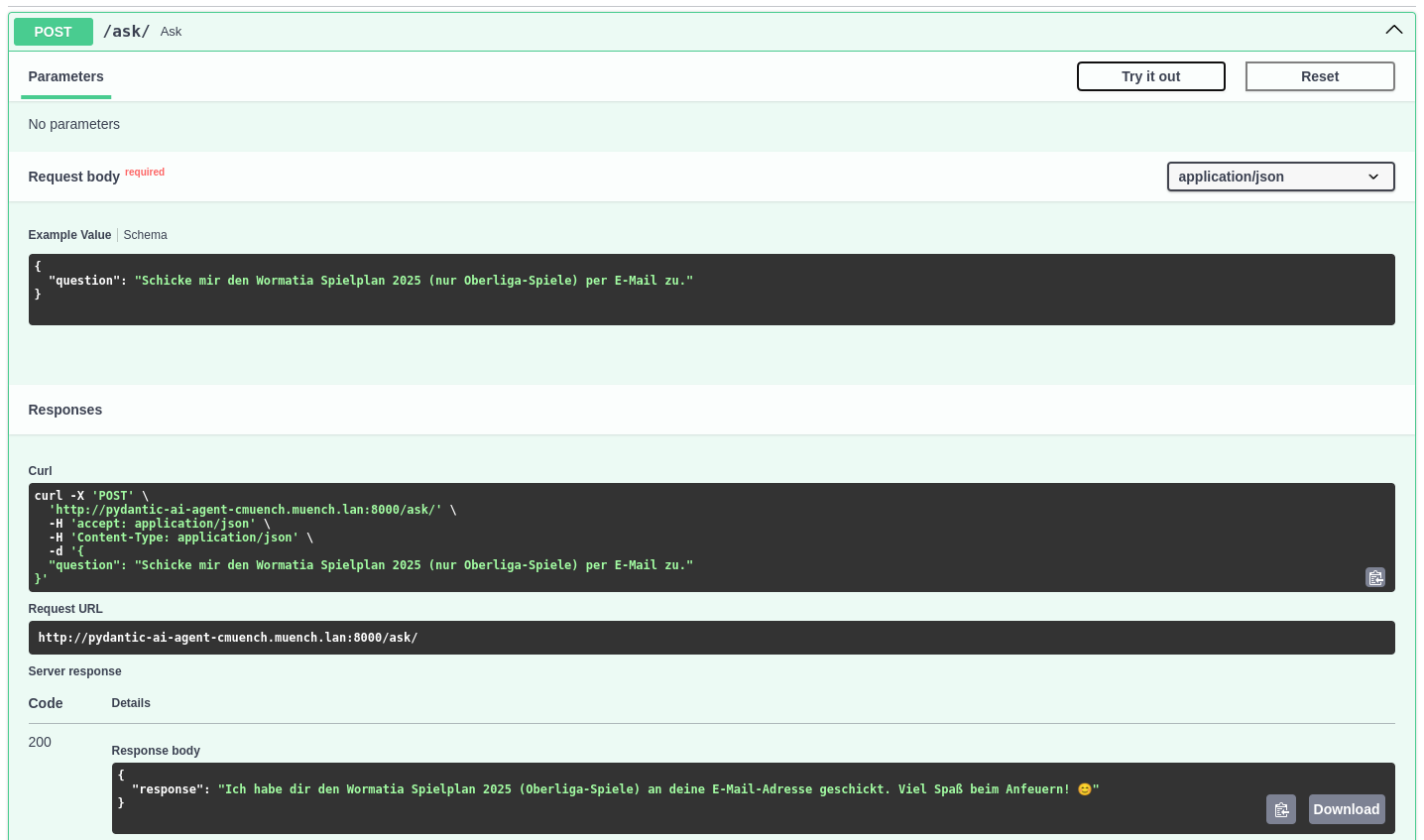
Thanks to the OpenAPI documentation, I can test the API directly and see which parameters I need to pass. The API also allows the agent to be integrated into other tools.
Telemetry
To keep track of all activities, I rely on telemetry tools such as Jaeger and Pydantic Logfire for distributed tracing. This lets me identify performance bottlenecks and optimize my agents' overall performance.
Pydantic offers a SaaS solution here with quite a generous free tier if you do not want to build your own infrastructure.
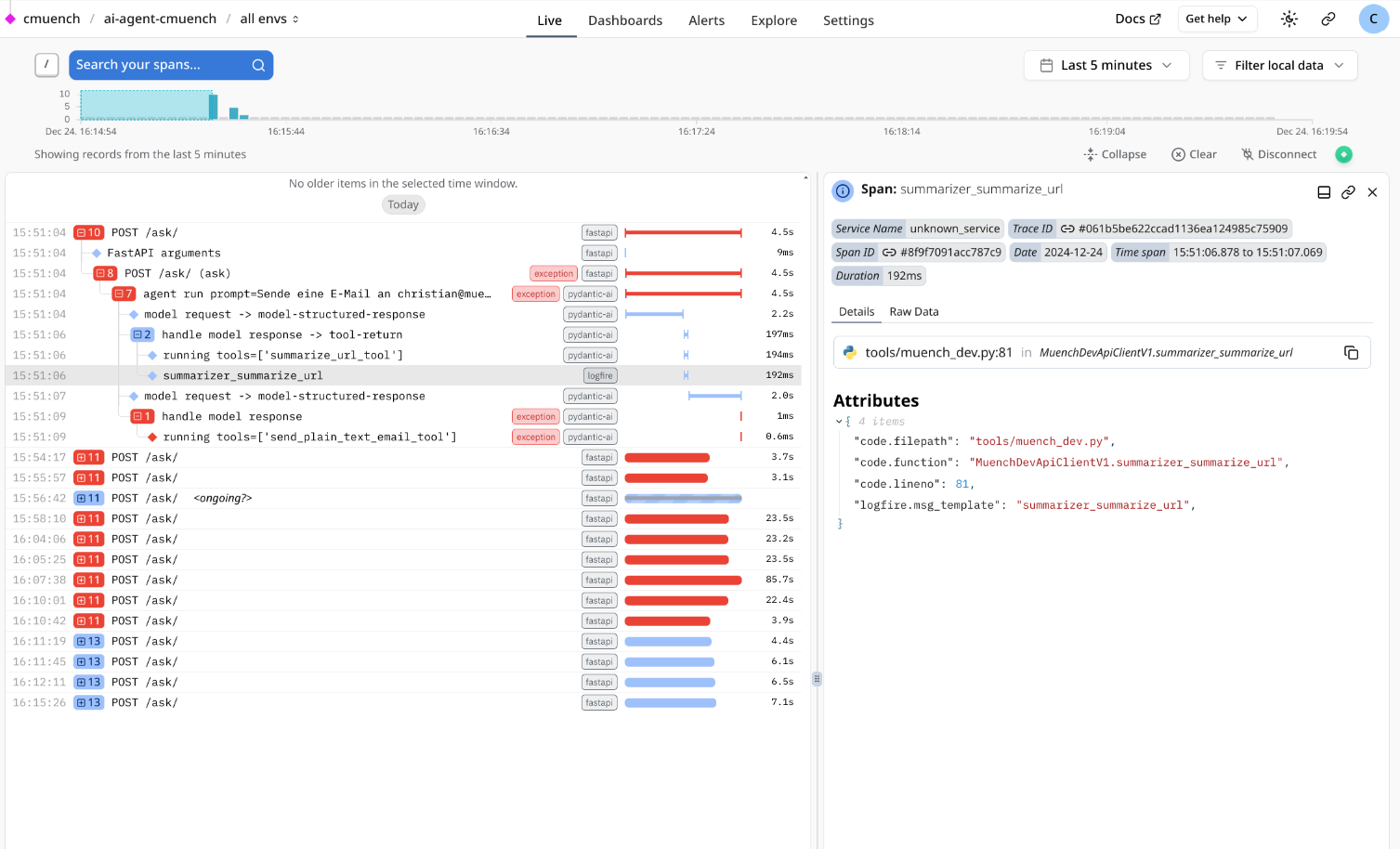
Since Pydantic Logfire was developed on the basis of the OpenTelemetry SDK, it is also possible to integrate your own telemetry tools. That is exactly what I have done, feeding the data into Jaeger.
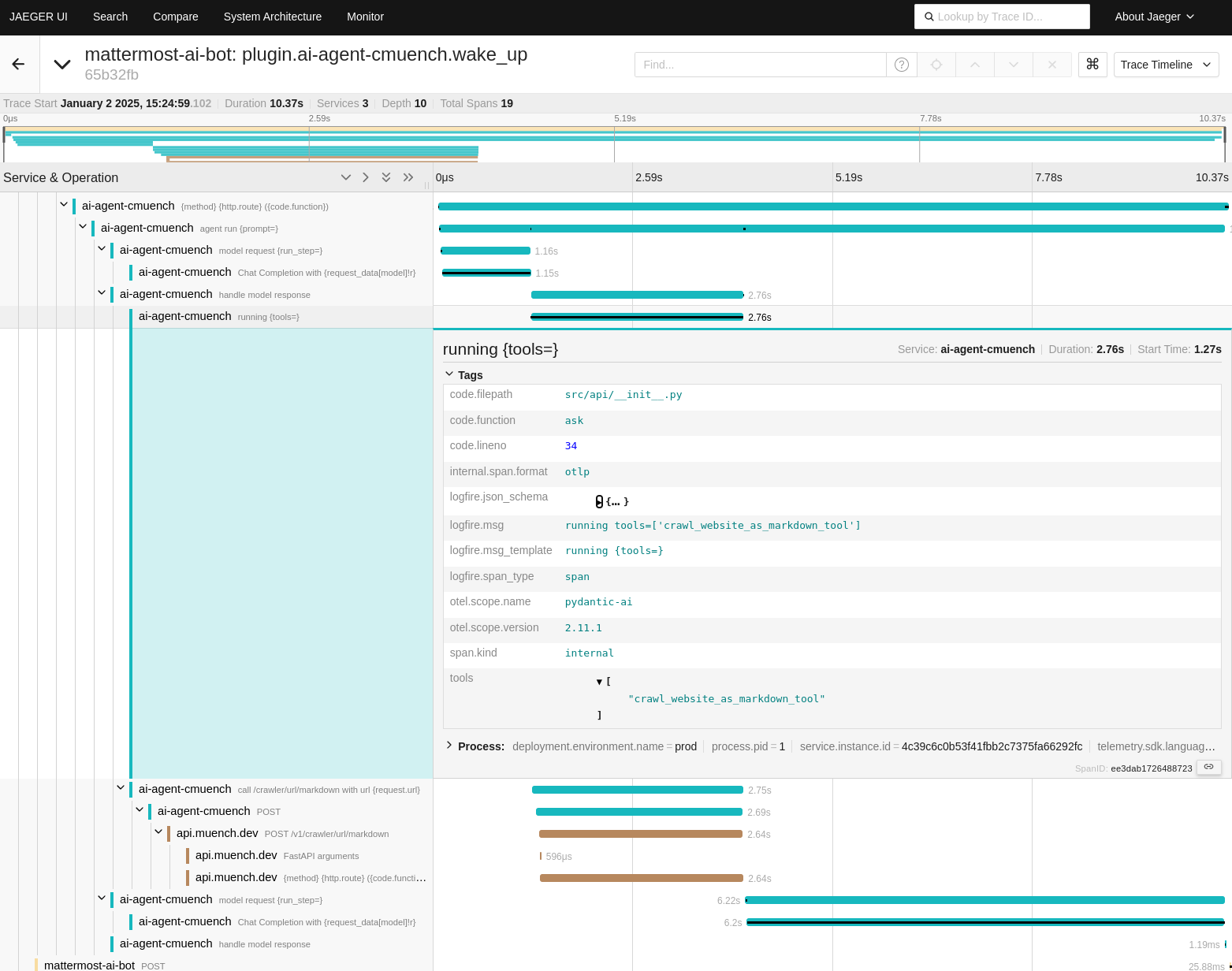
Telemetry tools also make troubleshooting significantly easier, because I can trace all communication between the agents and the services. This is particularly helpful when unexpected errors occur that are hard to reproduce. If an error occurs, I can see in my Jaeger dashboard which steps the agent went through and where problems arose.
Conclusion
Continuing to develop my AI agent infrastructure has shown me how powerful and flexible modern technologies are. The combination of Pydantic AI, n8n, Dagster, and various LLMs is extremely promising and opens up almost endless possibilities for automation and data processing.
If you are considering setting up your own agents, you should experiment with combining different tools and services to build a strong agent network. Use the advantages of type safety and modularity that Pydantic offers to connect your agents to different models and providers. In this exciting time of digital transformation, it is worth embracing new technologies with an open mind and constantly looking for creative ways to develop your projects further.
Stay curious and willing to experiment – the future belongs to those who are bold enough to try new paths!