In the following blog post, I want to show how easy it is to write a simple GraphQL server with PHP. We will use a well-known PHP library and ddev to set up a PHP environment with the current PHP 8.1.
I have already made the code shown in this blog post available on GitHub (link in the box at the end).
We create the project using simple shell commands.
mkdir php-graphql
cd php-graphql
ddev config --omit-containers="db,dba" --php-version="8.1"
ddev composer init
A local ddev project should now be accessible via the URL https://php-graphql.ddev.site in your browser. Since the project does not yet contain an index.php file, a 404 error should appear in the browser.
In the interactive shell, I then installed the latest version of the webonyx/graphql-php package.
The package is pretty much the standard GraphQL server implementation and is also used in many well-known PHP projects (including Magento, API Platform and Pimcore).
The composer.json then looks like this:
{
    "name": "muench-dev/graphql-server-example",
    "description": "A simple graphql server in PHP",
    "type": "project",
    "require": {
        "webonyx/graphql-php": "^14.11"
    },
    "license": "MIT",
    "autoload": {
        "psr-4": {
            "MuenchDev\\GraphqlServerExample\\": "src/"
        }
    },
    "authors": [
        {
            "name": "Christian Münch",
            "email": "christian@muench-worms.de"
        }
    ]
}
The interactive command installs the dependencies right away too.
If you want to do that manually, a simple ddev composer install is all you need with ddev.
And now we can get started.
GraphQL schema
We start by defining a schema. You can define the GraphQL schema programmatically. However, I do not want to do that, and have decided to maintain the schema in a file. The schema can be defined there using the Schema Definition Language.
Rather than come up with something myself, I borrowed an example from the php-graphql website and first removed the mutation. To get started, we want to create a Query. In this case, its name is greetings. As input, we want to send an object with the properties firstName and lastName through the input variable.
For this, we now create the file schema.graphql with the following contents.
schema {
  query: Query
}

type Query {
  greetings(input: HelloInput!): String!
}

input HelloInput {
  firstName: String!
  lastName: String
}
Since these schemas are very common by now, you can often install plugins in your IDE or editor of choice to make working with schema files easier.
VS Code immediately offered to install an extension, which worked very well too.
We are now ready to define the server.
The GraphQL server
There are various GraphQL server implementations in the PHP world. The graphql-php package already includes a server through the GraphQL\Server\StandardServer class.
// @link https://webonyx.github.io/graphql-php/executing-queries/#using-server
$server = new StandardServer($config);
$server->handleRequest();
The $config can either be a PHP array or be defined as an instance of GraphQL\Server\ServerConfig.
The object version is a builder that conveniently makes all configuration options accessible via setters.
To register the schema, we first need to read the file.
$contents = file_get_contents('schema.graphql');
$schema = BuildSchema::build($contents);
The schema can then be registered.
$config = ServerConfig::create()
    ->setSchema($schema)
    ->setDebugFlag($debug)
;
I also set a debug option so that we receive more information in error output during development.
The schema in the GraphQL client
There are countless GraphQL clients. Any client should be sufficient for testing the schema. Here, I used the Altair client. It can also be integrated directly into the browser as an extension.
In the client, simply enter the server URL, and you should then see the schema with our query.
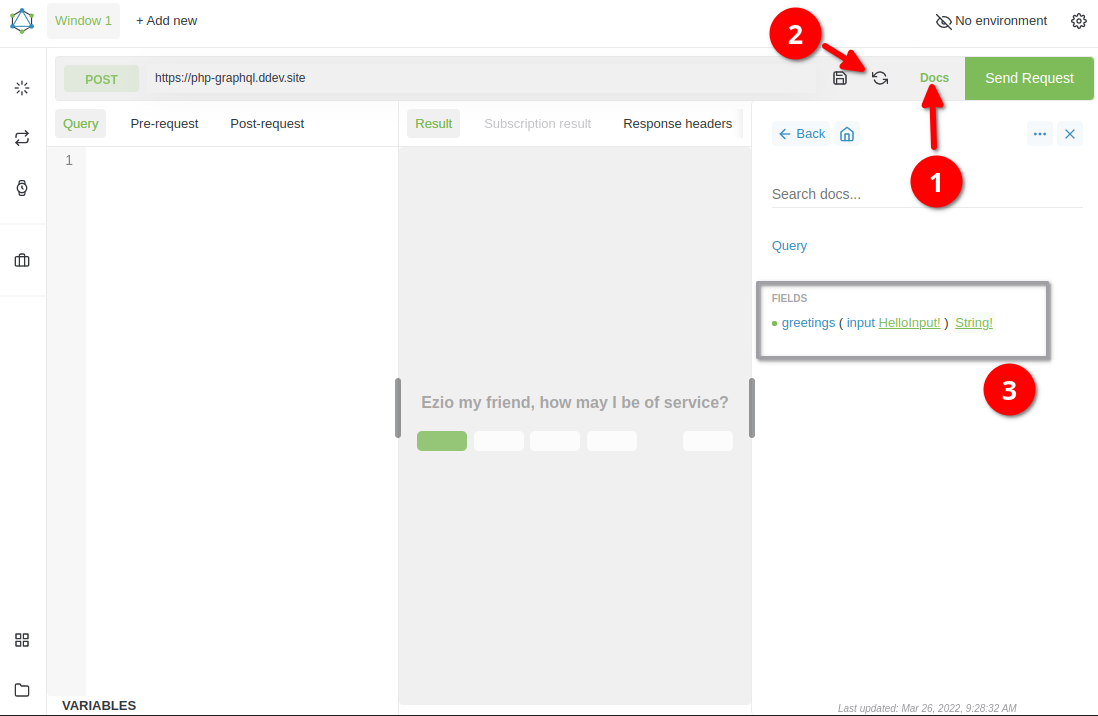
- Open the docs
- Reload the schema
- Query "greeting"
The query can now be sent to the server from the client.
To do this, enter the following query on the left-hand side of the client:
query {
  greetings(input: {firstName: "Peter", lastName: "Bimbelhuber"})
}
When the query is executed, however, an error should appear, as the server does not yet have any business logic to handle the query.
You should then get the following output:
{
  "errors": [
    {
      "debugMessage": "Cannot return null for non-nullable field \"Query.greetings\".",
      "message": "Internal server error",
      "extensions": {
        "category": "internal"
      },
      "locations": [
        {
          "line": 2,
          "column": 3
        }
      ],
      "path": [
        "greetings"
      ]
    }
  ]
}
Resolving the query
To resolve a query, we need what is called a resolver.
Our greeting logic is very simple. It should just take the first and last name from the input parameter and return a personal greeting message as a String.
A resolver this simple looks like this, for example:
$rootResolver = [
    'greetings' => function($root, $args, $context, $info) {
        return trim(
            sprintf(
            'Hello %s %s',
            $args['input']['firstName'],
            $args['input']['lastName'] ?? ''
            )
        );
    }
];
We register the resolver through the GraphQL server config.
$config = ServerConfig::create()
    ->setSchema($schema)
    ->setRootValue($rootResolver)
    ->setDebugFlag($debug)
;
That is it.
The server should now greet us properly.
Our query should now produce this response:
{
  "data": {
    "greetings": "Hello Peter Bimbelhuber"
  }
}
That was a simple GraphQL server in PHP that handles a simple query. But GraphQL can do much more. You can send more than one query, nest queries, and change data through mutations.
- https://github.com/cmuench/graphql-php-example
- https://graphql.org
- https://webonyx.github.io/graphql-php/
- https://graphqlite.thecodingmachine.io/docs
- https://github.com/overblog/GraphQLBundle