
The new Wormatia website has been live since yesterday. Together with my fellow Wormatia club member Christian Bub, we managed to completely overhaul the club website with just two people. Of course, it took a while. You can find the official announcement here: https://www.wormatia.de/willkommen-auf-der-neuen-homepage/
Here, though, I want to go into a little more detail about the technology...
TYPO3 History
A few facts. The old website ran on TYPO3 version 4.5. Yes, I know that is already outdated. Back then, we chose a special templating solution called TemplaVoila. There was nothing wrong with that solution. However, TYPO3 underwent a lot of changes, a new integrated solution emerged, and the developer behind TemplaVoila stopped supporting the extension.
Since I have not worked professionally with TYPO3 for years, dealing almost exclusively with Magento shops instead, I always shied away from updating the site. Of course, that did not help matters. Perhaps that is also why ten years have now passed between generation 4 and generation 5 of the Wormatia website!
This year, though, something had to be done. So Christian Bub and I decided that, if necessary, we would manually move the content—almost 1,000 static pages!—into a new system. At the time of that decision, it did not matter which system. In the end, we decided to switch from TYPO3 to Wordpress. When we first started the website, we had envisaged a large editorial workflow. That is no longer the case. Personally, I was never a big fan of Wordpress, since I mostly looked at the PHP code, which in my opinion was not that great. But it is not just about code quality. Maintaining content in the new Wordpress Gutenberg editor was definitely much faster than we were used to with TYPO3. Yes, I realize that the comparison is not entirely fair, since our TYPO3 was not up to date.

The homepage in the TYPO3 4.5 editor
So we got started with the migration...
Migration
The following things had to be done:
- Migrate users
- Set up the web server
- Maintain redirects for old URLs, using regular expressions because of the dynamic pages
- Set up email forms again
- Enable spam protection
- Set up Main WP for automatic updates
- Import TYPO3 tt-news posts into Wordpress
- Generate XML sitemaps for the search engine
- Configure Google Analytics
- Display dynamic content in Wordpress by writing a Wordpress plugin -> player database, results database
- Manually create static pages
- Come up with a navigation concept
- Mobile-first approach, with around 70% mobile usage
- Rework the Node-Red workflow for automatic news tweets
- Develop a Wordpress theme for Wormatia
- Integrate Prometheus monitoring
- Monitor Google Search Console
I am sure I have forgotten a few things. For me, the most time-consuming part was migrating the news. I struggled with that for quite a while, since there are few good scripts online. Since I was new to Wordpress, I first had to learn a bit about Wordpress development. When you work with Magento professionally, Wordpress is actually a little relaxing, since you can work a bit "dirtier" there.
For anyone planning something similar who needs to migrate tt-news entries, I have published our wp-cli command on Github. You still need to adapt it a little for your own purposes, but you do not have to start from scratch.
https://github.com/wormatia/TYPO3-Wordpress-Migration
-- Wormatia is doing open source now :-)
Next came the dynamic content. The Wormatia website contains one of the largest football archives in German football. The content in that archive is essentially the heart of the website, and every bit of it absolutely had to be preserved.
For the TYPO3 site, I had developed a plugin that allowed content to be embedded in the website via a kind of REST interface, although back then none of us knew the REST concept yet.
Since that worked brilliantly for more than 10 years, I wanted to carry the concept over to Wordpress as well. I quickly abandoned my idea of creating a Gutenberg block plugin because of the time needed to get up to speed. There are some great videos on Youtube on the subject. However, as a PHP backend developer, I was faster using a simple Wordpress shortcode. The shortcode lets you embed specific data in a page. You define the service, the method, and optionally a template for display. Speaking of templates... in the TYPO3 extension, we had chosen XSLT back then because it is so flexible and independent of the content. In the Wordpress plugin, we use a simple PHP template. All data from the remote service arrives as JSON and is deserialized and made available as a variable in the template. You can imagine how much faster creating the templates was. By now, I am glad we switched.
Mobile First
One thing that was definitely important to us was designing the new site for mobile use. That was difficult at times, but I think we managed it in the end. It is not perfect, but from my perspective it is a quantum leap. Previously, we had a separate site, "m.wormatia.de", with heavily stripped-down content, just to offer any mobile content at all.
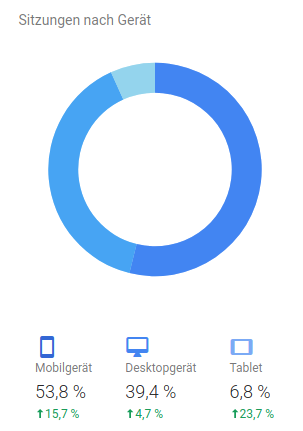
Google Analytics proves us right!
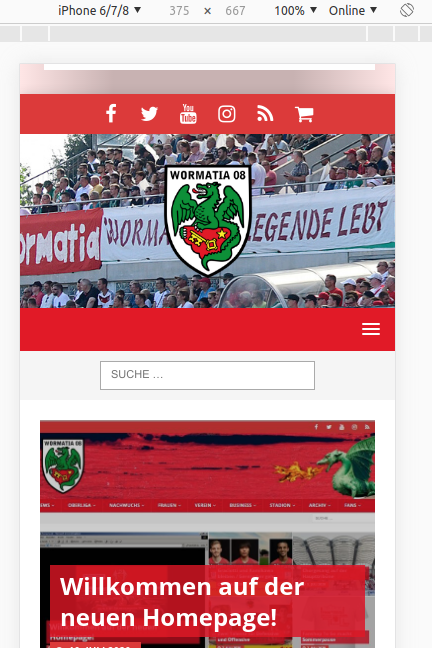
The complicated thing about optimizing for mobile devices is that you lose control. There are now so many devices and resolutions on the market that you cannot come anywhere close to testing every variation. We therefore decided to optimize for three resolutions covering most cases.
- Up to 400px
- Up to 768px
- >769px
(All widths)


Monitoring
Interestingly, switching to Wordpress gave our server considerably more work to do. TYPO3, however, had sophisticated caching logic. Wordpress regenerates pages every time out of the box. After a while, I thought I should do something about that. Installing a cache plugin calmed the server down again a little. It was never overloaded, but of course you need to take a few precautions.
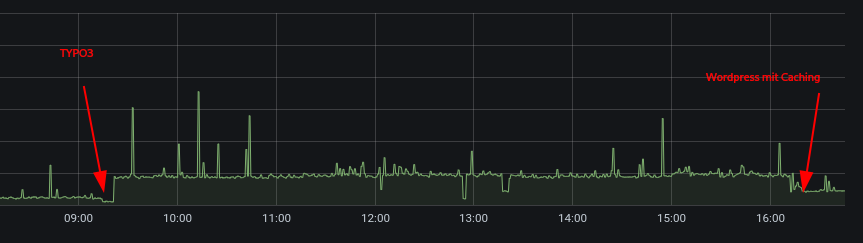
CPU load on the server after the migration
We use Prometheus for monitoring. I can highly recommend it, since it is very lightweight and creates hardly any load on the systems being monitored. We use it to monitor the usual things, such as CPU and memory usage, whether the disk is filling up, temperatures, and so on.
But we also monitor database metrics and whether Wordpress is up to date. The metrics can also be integrated very nicely into Grafana.
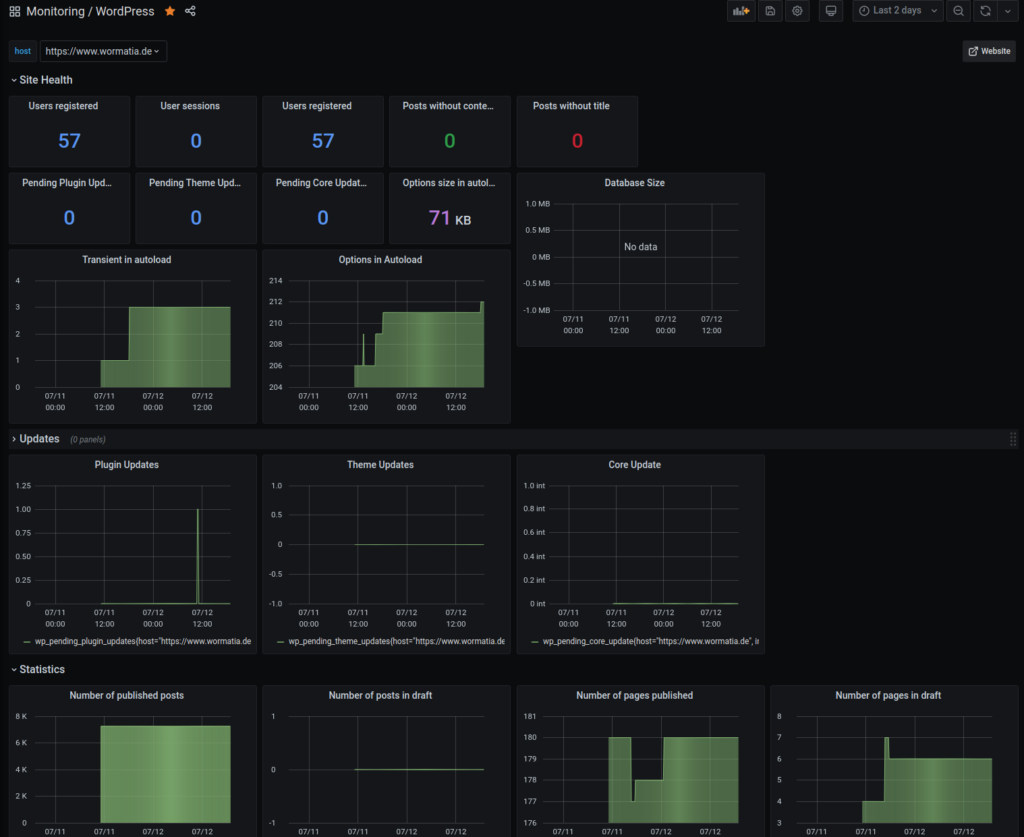
Wordpress monitoring
Well, that is it for today for now. If I think of anything else, I will update this blog post.
Update July 15, 2020 (Cache Plugin)
Today I changed a few settings on the MySQL server. The InnoDB memory was doubled. I also changed the tx_isolation level from reapeatable-read to read-commited. MySQL runs much better with that.
Another change was replacing the cache plugin. The new W3 Total Cache includes an object cache alongside the full-page cache, which I also placed in a tmpfs. That seems to take a lot of load off the database. Everything is running smoothly so far. The site has become around 3x faster.

The CPU has much less work to do

The homepage's TTFB has now dropped significantly
Update July 24, 2020 (JS/CSS Bundling, Image Optimization)
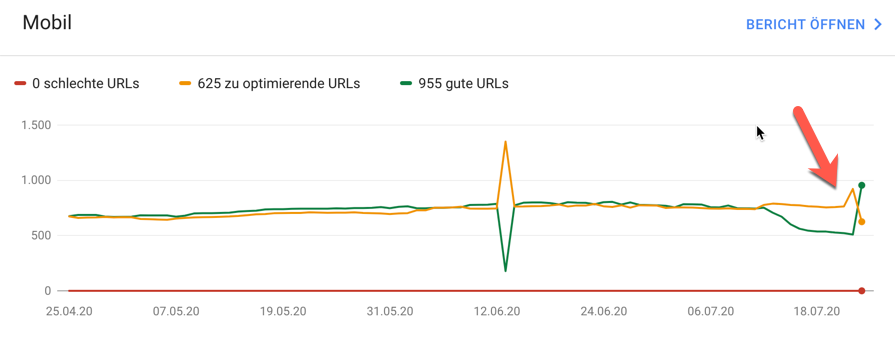
The new website is now running quite well, so I have started working on further optimizations. The site itself was still a little sluggish at times. Google flagged that as well. A few tests with GTmetrix confirmed that we should optimize the CSS and JS includes. Fortunately, this can also be configured through the W3 Total Cache plugin. The position of the JS includes was also moved from the "Head" to just before the closing body element. This helps prevent loading the JS from blocking rendering.
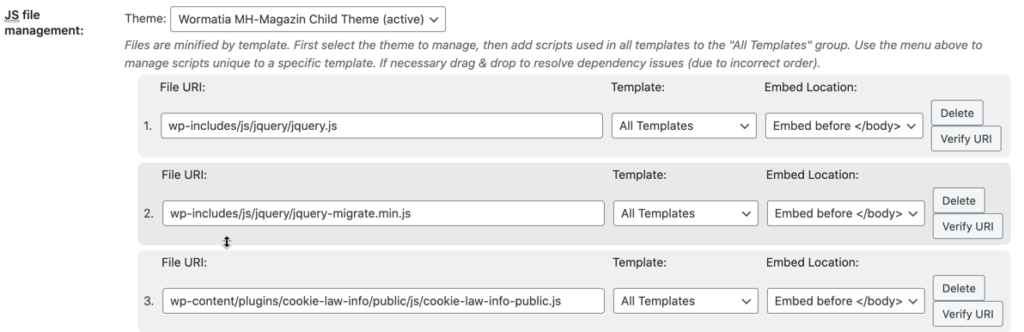
JS bundle settings / Minify tab / W3 Total Cache plugin
Google is already noticing the optimizations as well. The trend should now reverse.
Another issue was the images, some of which were 700–800 KBytes and made the homepage alone grow to 1.7 MBytes. Since we did not want to reduce the number of images, optimizing them brought the size down to <1MByte.
The free Wordpress plugin from https://resmush.it delivered the results we wanted here.
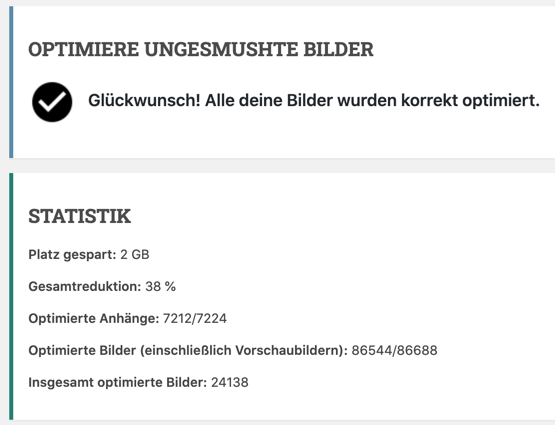
Success message
Image optimization ran for around 10 hours on our server and optimized a lot of images.
The overall result is noticeably better performance on all devices.
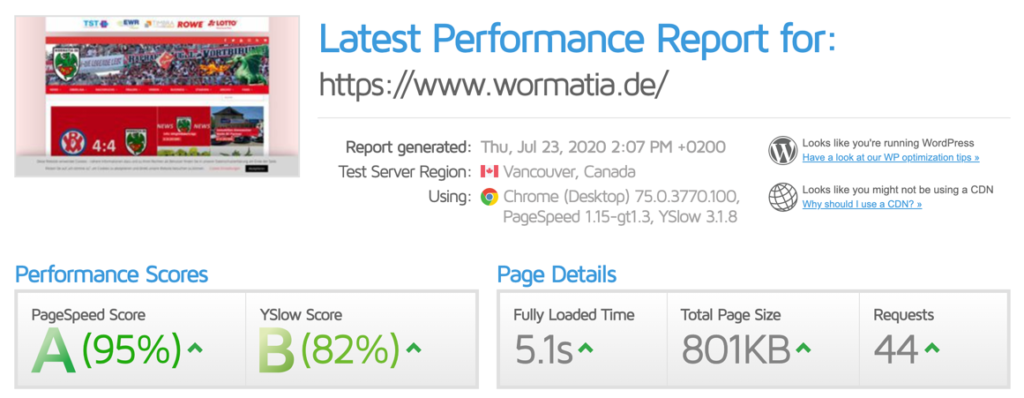
The result is already looking pretty good :-)