
For a few months now, I have been running my Linux workstation and a small Intel NUC server with Arch Linux. Arch Linux is a so-called rolling release distribution. This means there are no traditional releases, for example every six months. Updates are rolled out and made available relatively quickly. Interestingly, relatively little breaks in the process. In all the time I have been running Arch Linux, my system failed to boot once because there was a small bug in the LVM package. I was able to fix that easily by downgrading the package from a system booted from a USB stick. The second problem came after updating my Nvidia driver. There were sound problems when transmitting audio over the DisplayPort cable. All in all, relatively painless. On the other hand, you also get bug fixes, new features, or a new Linux kernel very quickly.
Arch Linux on My Private Server
Some people say that running a server with Arch is not a good idea. But that is more about vendor support and other issues that tend to apply to professional hosting. I run an Arch server at home in a small server rack. So this is my private system. Here, too, I like to stay up to date. To avoid missing pending updates, I monitor all my machines with checkmk.
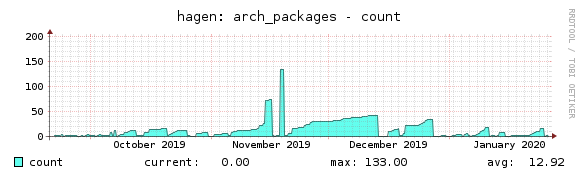
check_mk - Monitoring packages that need updating
Updates via a systemd Timer
Since Arch gets new packages very frequently, sometimes several times a day, my monitoring alerts go off very often. So far, I have simply installed every update on the server and have not had any problems. That made me think there must be some way to automate updates. And sure enough, someone in the Arch community had already done just that.
https://www.techrapid.uk/2017/04/automatically-update-arch-linux-with-systemd.html
The solution is relatively simple. You create a service that can run as soon as a network connection is available. The service can automatically handle the otherwise manual work using the pac package manager. A timer is started after the system boots. Like a cron job, this timer starts the service every 60 minutes.
To add this to your Arch Linux installation, you need to create two files.
The service at /etc/systemd/system/autoupdate.service, and the timer at /etc/systemd/system/autoupdate.timer:
[Unit]
Description=Automatic Update
After=network-online.target

[Service]
Type=simple
ExecStart=/usr/bin/pacman -Syuq --noconfirm
TimeoutStopSec=180
KillMode=process
KillSignal=SIGINT

[Install]
WantedBy=multi-user.target

Den Timer unter **/etc/systemd/system/autoupdate.timer**

[Unit]
Description=Automatic Update when booted up after 5 minutes then check the system for updates every 60 minutes

[Timer]
OnBootSec=5min
OnUnitActiveSec=60min
Unit=autoupdate.service

[Install]
WantedBy=multi-user.target
After that, the systemd timer needs to be enabled.
systemctl enable --now /etc/systemd/system/autoupdate.timer
Checking Whether Everything Works ...
You can check whether the timer has started as follows:
journalctl -u autoupdate.timer
If you want to see which timers are running on the system and when they will run again, the following command is useful.
systemctl list-timers
If everything is working correctly, you can see in pacman's log at /var/log/pacman.log that a check, and possibly an update, has taken place every hour.
[2020-01-25T16:28:40+0000] [PACMAN] synchronizing package lists
[2020-01-25T16:28:41+0000] [PACMAN] starting full system upgrade
[2020-01-25T16:28:43+0000] [ALPM] transaction started
[2020-01-25T16:28:43+0000] [ALPM] upgraded python (3.8.1-3 -> 3.8.1-4)
[2020-01-25T16:28:43+0000] [ALPM] upgraded python-six (1.13.0-2 -> 1.14.0-1)
[2020-01-25T16:28:43+0000] [ALPM] transaction completed
[2020-01-25T16:28:43+0000] [ALPM] running '30-systemd-update.hook'...
[2020-01-25T17:28:40+0000] [PACMAN] Running '/usr/bin/pacman -Syuq --noconfirm'
[2020-01-25T17:28:40+0000] [PACMAN] synchronizing package lists
[2020-01-25T17:28:41+0000] [PACMAN] starting full system upgrade
[2020-01-25T18:28:50+0000] [PACMAN] Running '/usr/bin/pacman -Syuq --noconfirm'
[2020-01-25T18:28:50+0000] [PACMAN] synchronizing package lists
[2020-01-25T18:28:51+0000] [PACMAN] starting full system upgrade
[2020-01-25T19:29:01+0000] [PACMAN] Running '/usr/bin/pacman -Syuq --noconfirm'
[2020-01-25T19:29:01+0000] [PACMAN] synchronizing package lists
[2020-01-25T19:29:02+0000] [PACMAN] starting full system upgrade
Whether you like this approach or not, feel free to leave a comment on my blog.
Update January 26, 2020, 14:30
I decided to turn the whole thing into an AUR package. This is the first package I have published for Arch Linux.
https://aur.archlinux.org/packages/pacman-auto-update/
This makes installation much easier.
Update January 15, 2025, 15:04
The package was removed from the AUR with the following note:
Alad [1] filed a deletion request for pacman-auto-update [2]:
While AUR packages are used at people's discretion, this package has
the explicit aim to propagate upgrade mechanisms that will, possibly
irreversibly, break an Arch system. As such it cannot be argued the
package is useful and therefore goes against the AUR submission
guidelines. See also Xyne's comment.[1] https://aur.archlinux.org/account/Alad/
[2] https://aur.archlinux.org/pkgbase/pacman-auto-update/
I'll leave that comment as it stands, without commenting on it.
The package is still available on Github at https://github.com/cmuench/pacman-auto-update.
There you will find instructions for installing the package without the AUR.