
JetBrains recently started offering Snaps for installing its products. Since I had been wanting to try Snaps for a while, I did just that today.
Snaps are a kind of container for applications. This has been familiar on the Mac for some time. There, .app files hide an entire directory structure. The idea is that you can quickly install applications (usually with a graphical interface) on Linux without having to pay too much attention to the maintainers of other packages or libraries. This has both advantages and disadvantages.
You can find a description of Snaps on the project's website https://snapcraft.io. It suggests that virtually all Linux distributions support this concept. In reality, Snaps come from Canonical, the company behind Ubuntu. Fedora tends to favor Flatpak. Flatpak has a different concept and works with runtimes. But that is another topic.
Back to installing Snaps on Fedora 27. Installing the Snapd service, which then manages the Snaps, is very easy.
The Snap website gives the following instructions:
sudo dnf install snapd
sudo ln -s /var/lib/snapd/snap /snap
This runs through just fine. The installation does come from the Fedora repository, though.
After that, you can log in with an Ubuntu account. Ubuntu promises a few benefits from doing so. There is talk of private Snaps. But this is more about a Snap store where applications can be sold.
For testing, I installed PhpStorm. That is still straightforward and is also described by Jetbrains.
sudo snap install phpstorm --classic
The installation also completes without a hitch. But something has to go wrong now...
How do you start a Snap like this? I look for the app in my Gnome application list. There is nothing to see. Where could the application be?
I do a little research. Apparently, this is not supported on Fedora. So I first try starting the application manually from the console. But the application is not found.... What now?
I find the application under /snap/bin/phpstorm. This is a symlink pointing to /usr/bin/snap. I try to start phpstorm through it.
The application does not start and quits with:
snap execv failed: No such file or directory
What should I do now? I decide to monitor the whole thing with strace.
A strace phpstorm reveals that the program snap-exec cannot be found. It is being searched for under "/usr/lib/snapd". On our system, however, the program is located under /usr/libexec/snapd.
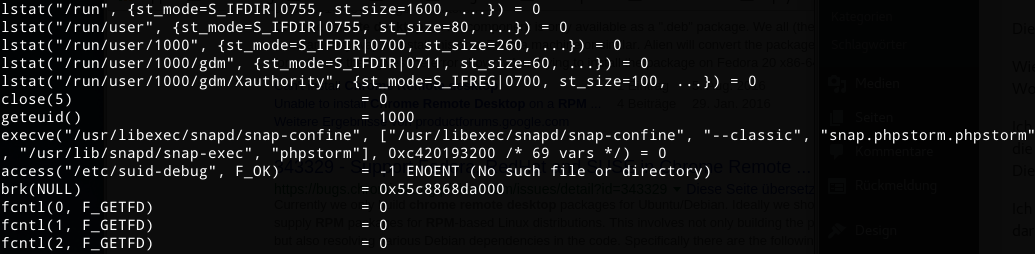
So we create a symlink:
sudo ln -s /usr/libexec/snapd /usr/lib/snapd
After that, Phpstorm can be started successfully via "/snap/bin/phpstorm".
If you want to make things more convenient in the console, you can also add /snap/bin to your $PATH variable.
If you want PhpStorm in your Gnome start menu, you can create the file .local/share/applications/phpstorm.desktop with the following contents.
[Desktop Entry]
Version=1.0
Type=Application
Name=PhpStorm
Icon=/snap/phpstorm/current/bin/phpstorm.png
Exec=/snap/bin/phpstorm %f
Comment=The Drive to Develop
Categories=Development;IDE;
Terminal=false
StartupWMClass=jetbrains-phpstorm
Have you found an easier way? Then just leave a comment here.