Just tested it and liked it. Without outside help, PhpStorm cannot simply evaluate factory methods for every framework.
In Magento, these include functions such as Mage::getModel('catalog/product'), which determine the class in the background based on an XML structure.
Since the latest build (129.196), you can now take charge of resolving these yourself through a standalone PHP script.
For example, it looks like this:
namespace PHPSTORM_META {
  /** @noinspection PhpUnusedLocalVariableInspection */
  /** @noinspection PhpIllegalArrayKeyTypeInspection */
  $STATIC_METHOD_TYPES = [
      \Mage::helper('') => [
           'core/string' instanceof \Mage_Core_Helper_String,
      ],
      \Mage::getSingleton('') => [
           'core/resource' instanceof \Mage_Core_Model_Resource,
      ],
      \Mage::getModel('') => [
           'catalog/product' instanceof \Mage_Catalog_Model_Product,
           'rating/rating' instanceof \Mage_Rating_Model_Rating,
      ],
  ];
}
The recommended filename is .phpstorm.meta.php. But the file can also have a different name. In this case, I followed the standard. It would be nice if everyone did that, so you do not have to search for the file in an unfamiliar project.
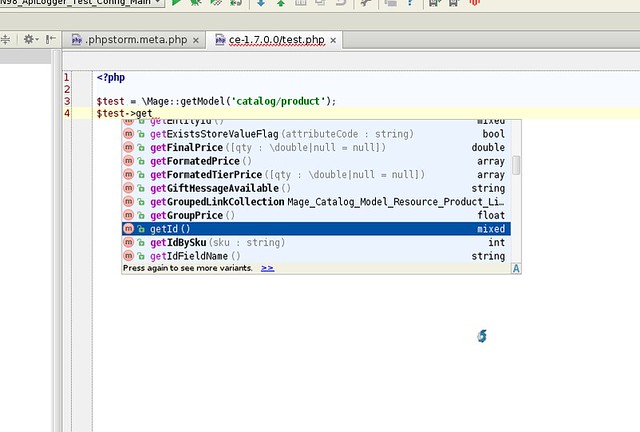
In the IDE, it then appears as in this test case:
The next possible steps would be to generate the PHP file containing the metadata through a script, or dynamically call the PhpStorm API in a plugin such as Magicento. The latter route is certainly the best. But not all projects are Magento projects, and you are now able to "quickly" switch on code completion yourself.