[Recently, n98-magerun gained the ability to check a shop for rewrite conflicts. The tool checks whether multiple modules are trying to rewrite a class. If that is the case, the PHP Reflection API is additionally used to check whether the last class in the rewrite chain inherits from the previous one. If, for example, more than two classes define the same rewrite, the entire chain is checked. With this check, I want to prevent "false positives", since some developers may well have resolved the conflict through inheritance.
To avoid having to do this manually over and over again, and perhaps simply forgetting, version 1.30.1 introduced the option of logging the results to a JUnit XML file instead of the console.
I quickly put the classes for generating the XML files into their own project, which can also be found on github.
https://github.com/cmuench/junit-xml
(Thanks to Nils Adermann, who said at our last PHPUG Rheinhessen meeting that developers should create more small packages rather than large "monolithic class collections"). The package can be integrated through Packagist / Composer.
The latest version of n98-magerun (1.30.1) now supports the --log-junit option in the dev:module:rewrite:conflicts command. This option lets you simply specify an XML file to which the check results will be logged. The results can then be published alongside PHPUnit tests, for example.
In other words: if there are rewrite conflicts, the build is unstable!
Here is how it works...
Installing the Jenkins Server
Of course, another CI server can be used instead of Jenkins.
Jenkins can be installed on Linux through a repository.
On Debian systems:
apt-get install jenkins
If you just want to try it out, you can also download the WAR file. This is a JAR file containing a stub for running as a web server. Incidentally, the same thing is also possible with Phar files in PHP. But that would take us too far here.
wget http://mirrors.jenkins-ci.org/war/latest/jenkins.war
java -jar jenkins.war --httpPort=8080
Port 8080 is only an example here and can be replaced with another unused port.
The Jenkins server should now be accessible at http://localhost:8080. If the WAR file is run directly by a local user, Jenkins creates a .jenkins directory in the user's home directory. The entire configuration is then stored there. The jobs that are created and their directories are also located here.
Jenkins Phing Plugin
After starting the Jenkins server, if you use Phing, you still need to install the appropriate plugin. If you use ANT, you can skip this step.
Installing a plugin is surprisingly easy:
- Click "Manage Jenkins"
- Click "Manage Plugins"
- Switch to the "Available" tab.
- Search for "Jenkins Phing plugin" and check the checkbox.
- Click the "Download now and install after restart" button at the bottom of the page
Creating a Build Script
A build script (Ant or, as here, Phing) lets you quickly integrate n98-magerun into the CI server.
<?xml version="1.0" encoding="utf-8"?>
<project name="test" default="dist">

    <target name="dist">
        <exec command="n98-magerun.phar dev:module:rewrite:conflicts --log-junit=reports/junit/conflicts.xml" />
    </target>

</project>
(n98-magerun.phar should be globally executable. Ideally, it should reside in /usr/bin or /usr/local/bin)
Ideally, the build script is checked directly into version control such as GIT or SVN and checked out through Jenkins.
Jenkins includes support for the best-known version control systems for this purpose.
Integrating the Build Script into Jenkins
Now create a job. In the job configuration, under "Add build step", you will now find the installed Phing build step, "Invoke Phing Targets". Enter the build.xml file that generates the JUnit XML there.
As a post-build step, you also need to select "Publish JUnit test result report". Enter the path to the directory containing the XML file(s).
If XML files are also generated by PHPUnit, for example, you should use *.xml.
All files must be in the same directory. That should be it.
For me, it looks like this:
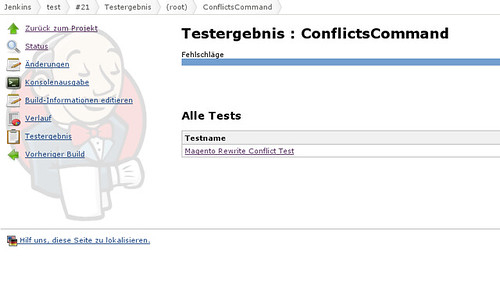
Have fun "playing around". And do not forget: running n98-magerun.phar self-update regularly is worthwhile.