
I have been working with Arch Linux for a while and am very happy with it. Arch comes with a package system consisting of various repositories.
You can get a good overview on the following page:
https://wiki.archlinux.org/index.php/Official_repositories
This article is about packages that you can publish in the so-called AUR (Arch User Repository). You cannot publish binary packages there. What gets published is always source code, which is then built into the application using a build script.
Users can vote for a package. Once it has enough votes, the package can be moved into the "Community" repository, which is also allowed to contain applications that have already been built. It is something like a trusted network.
Registering with the AUR
To publish packages in the AUR, you need an account. Register at https://aur.archlinux.org/register/ to get one.
After registering successfully, add your public key to your user account. It will be used with GIT later.
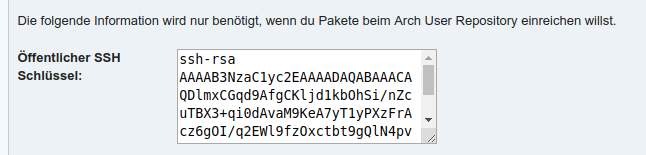
SSH Public Key
Building a Package
First, copy the package skeleton. It is already present on every Arch Linux system. Before doing that, create a directory for your new package and use "cd" in the terminal of your choice to move into it. Yes, everything here happens in the terminal. If you are looking for a point-and-click workflow... wrong article.
cp /usr/share/pacman/PKGBUILD.proto PKGBUILD
The PKGBUILD file itself is something like a Bash script with metadata and functions. Metadata such as the package name, author, or license is defined as variables in the upper section. I think this is relatively self-explanatory.
# This is an example PKGBUILD file. Use this as a start to creating your own,
# and remove these comments. For more information, see 'man PKGBUILD'.
# NOTE: Please fill out the license field for your package! If it is unknown,
# then please put 'unknown'.

# Maintainer: Your Name <youremail@domain.com>
pkgname=NAME
pkgver=VERSION
pkgrel=1
epoch=
pkgdesc=""
arch=()
url=""
license=('GPL')
groups=()
depends=()
makedepends=()
checkdepends=()
optdepends=()
provides=()
conflicts=()
replaces=()
backup=()
options=()
install=
changelog=
source=("$pkgname-$pkgver.tar.gz"
        "$pkgname-$pkgver.patch")
noextract=()
md5sums=()
validpgpkeys=()
In the lower section, you have various HOOK functions that are called at different points during the build process or installation.
prepare() {
	cd "$pkgname-$pkgver"
	patch -p1 -i "$srcdir/$pkgname-$pkgver.patch"
}

build() {
	cd "$pkgname-$pkgver"
	./configure --prefix=/usr
	make
}

check() {
	cd "$pkgname-$pkgver"
	make -k check
}

package() {
	cd "$pkgname-$pkgver"
	make DESTDIR="$pkgdir/" install
}
If your package contains external data, such as a downloaded tarball, you can enter the file's URL in the "src" variable. For security, you must always provide a checksum for the downloaded file.
Generate the checksum as follows:
updpkgsums
Once everything in the package is ready, you should build it once to test it.
makepkg
If you add the -i option, the package will also be installed immediately.
Publishing the Package
git init
git add -a -m "Initial commit"
git remote add aur ssh://aur@aur.archlinux.org/
Watch out! Before the first push, you absolutely must create the .SRCINFO file.
A .SRCINFO file must be included.
makepkg --printsrcinfo > .SRCINFO
After a git commit, you are done here. Now you can send your data to the AUR. It is important to send everything together in the first commit.
git push aur master
A few automatic checks now run on the AUR server. If everything is correct, we are done and can find our new package in the AUR.
If not, you will receive an appropriate error message.
Troubleshooting
If you accidentally pushed without .SRCINFO, you need to perform a rebase, since the first push is validated by a Git hook on the AUR side.
git rebase -i --root