As a subscription holder, I am fortunate enough to be able to try out the latest version of Aqua Data Studio straight away. That is exactly why I was pleased to receive an email about beta-testing the new version 7.0.0.beta.14.
The first thing you notice is the stylish new splash screen. But that is a less important feature... So first, here is a list of what's new:
- New debuggers for Microsoft SQL Server and DB2
- DBA tools for MySQL (very important)
- Reworked chart features
- Multiple selection of objects for scripting
- Comment functionality for columns and tables (super useful)
- Support for new databases (Apache Derby and DB2 for iSeries)
- Improved scripting support
- Improved comparison tools
- New ER modeler (finally!)
- Colors for tabs (can be set at server level)
As you can see, that is quite a lot. Since I have to work with MySQL databases a lot, I find the support for MySQL administration particularly great. Until now, I had to do many things in MySQL Administration. But it is not suitable for SQL development. Now I can finally do everything from within one program.
The following administration components are now available for MySQL:
- Instance Manager
- Server statistics and information
- Installed plugins
- Status (system-wide sessions, usage statistics, ...)
- Storage Manager
- Storage usage of individual databases
- Overview of all available storage engines
- Usage overview for individual tables
- Display of currently open tables
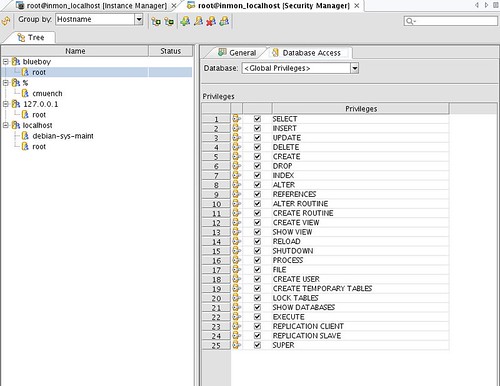
- Security Manager
- Creating, modifying and deleting users
- Tree structure: display of users and roles
- Session Manager
- Identifying database locks
- Display of current sessions
- Monitor with the ability to terminate individual sessions
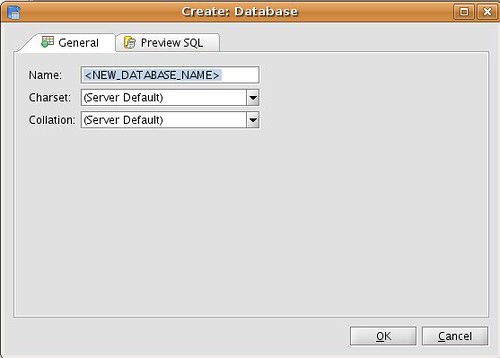
But the support goes even further. When creating tables, you can now select the character set and collation directly. This is a genuinely useful feature. Who hasn't encountered problems because the server defaults to "latin1_swedish_ci" and you then have to change the tables and columns back to "utf8" afterward?
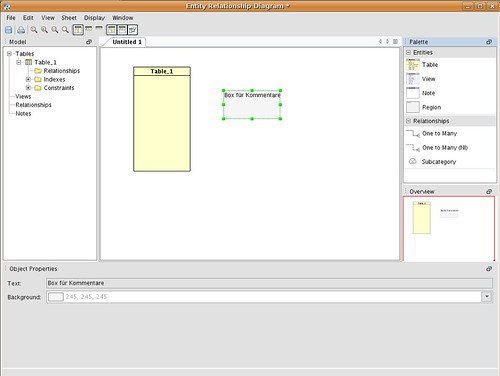
I would also like to highlight the new ER diagram editor, which was developed from scratch. It is now possible to create and modify a schema directly in the editor. The editor then produces an SQL script, which can in turn be imported. This is a huge improvement over the old editor, which could only reverse-engineer an existing database and offered no editing functionality.
That is all for now. The version is still in beta, so use the program at your own risk.